Fourteen models. Names that sound almost identical Go 7, Go 10.3, Go Color 7, Go Color 7 Gen II. Spec sheets full of numbers that tell you nothing about whether you’ll actually enjoy reading on the thing.
Right BOOX eReader for Your Reading Style
That’s the real problem with choosing a BOOX eReader, and no amount of ppi comparison solves it. So this guide works backwards from something you already know: how you read. Figure out your dominant habit first, and the right BOOX narrows to two or three options almost immediately. Start with the spec sheet instead, and you’ll end up with a device that’s technically impressive and quietly annoying.
Start with how you read, not with the spec sheet
The best predictor of whether you’ll love a BOOX is how well its screen size matches your dominant reading habit. Everything else colour, stylus support, storage, processor is a secondary filter applied after that. Get the size right and a modest model delights you. Get it wrong and the flagship gathers dust.
Four things genuinely change your day-to-day experience:
- Screen size: decided at purchase, unfixable afterwards.
- Weight: the quiet reason devices stop getting picked up.
- Colour or mono: a real trade-off, not a free upgrade.
- Pen support: worth paying for only if you already annotate.
Notice what isn’t on that list: processor speed, RAM, storage. On an E Ink device those affect how snappily menus respond, not how good the reading is. They matter to heavy app users and multitaskers, and almost nobody else.
The five reading styles (and the BOOX that fits each)
Most readers fall into one of five patterns: the one-book-at-a-time novel reader, the pocket reader filling small gaps in the day, the manga and comics reader, the PDF and textbook reader, and the annotator who writes as much as they read. Each maps to a different size band and a different short list.
The one-book-at-a-time novel reader
You read fiction, one title at a time, mostly at home or in bed. Your books are EPUBs or Kindle purchases reflowable text that adapts to any screen.
Look at: Go 6, Go 7, Page 7.
A 6″ or 7″ mono screen is genuinely the right tool here, and going bigger is the most common regret in this category. Reflowable text resizes to fit whatever screen you give it, so a larger panel doesn’t show you more of the book in any useful sense it just adds weight to your wrist and bulk to your bag. Physical page-turn buttons matter more than screen inches for this style of reading, because they let you hold the device in one position for an hour without shifting your grip.
The pocket reader who reads in gaps
Ten minutes on the bus. A queue at the supermarket. The twenty minutes before sleep when picking up your phone is a mistake.
Look at: Palma 2, Palma 2 Pro.
These are phone-shaped E Ink devices, and the point isn’t that they’re small it’s that they fit exactly where your phone lives, without the notifications. Plenty of people buy one specifically as a phone substitute for idle moments, and it works because the friction runs the right way: E Ink is pleasant for text and actively bad for video and scrolling feeds. One-handed, pocketable, and unremarkable enough to use in public.
The manga, comics and art-book reader
Fixed-layout pages, panel art, and colour that’s part of the content rather than decoration.
Look at: Go Color 7, Go Color 7 Gen II, Note Air 5C.
This is where colour E Ink genuinely earns its price. Manga is mostly monochrome and reads well on any mono screen, but comics, graphic novels, illustrated non-fiction and marked-up documents change character in colour. Seven inches is a reasonable compromise for manga; if you read Western comics with full-page spreads, step up to 10.3″.
The PDF, textbook and journal reader
Academic papers, technical manuals, sheet music, scanned textbooks, work documents.
Look at: Go 10.3, Go 10.3 Gen II, Note Max.
Here screen size stops being preference and becomes a requirement. Fixed-layout PDFs don’t reflow — an A4 page rendered on a 7″ screen means pinch-zooming and panning on every single page, which gets old within one paper. A 10.3″ screen shows an A4 page at a readable size. The 13.3″ Note Max shows it close to actual size, which is the difference between tolerating PDFs and enjoying them.
If most of what you read is fixed-layout, buy the biggest screen you can justify. It’s the one scenario where “go bigger” is straightforwardly correct.
The annotator and note-taker
You write in margins. You mark up drafts. Your reading and your thinking happen in the same session.
Look at: Note Air 4C, Note Air 5C, Note Max, Tab Ultra C Pro, Tab X C.
The Note line is built around the pen: annotate a PDF, keep handwritten notebooks alongside your library, export to cloud storage. The Tab models add more processing headroom for people running several Android apps and treating the device as a light workstation rather than a reader with a stylus. If you’re not sure which side of that line you’re on, you’re probably on the Note side.
Screen size: the decision you can’t undo with software
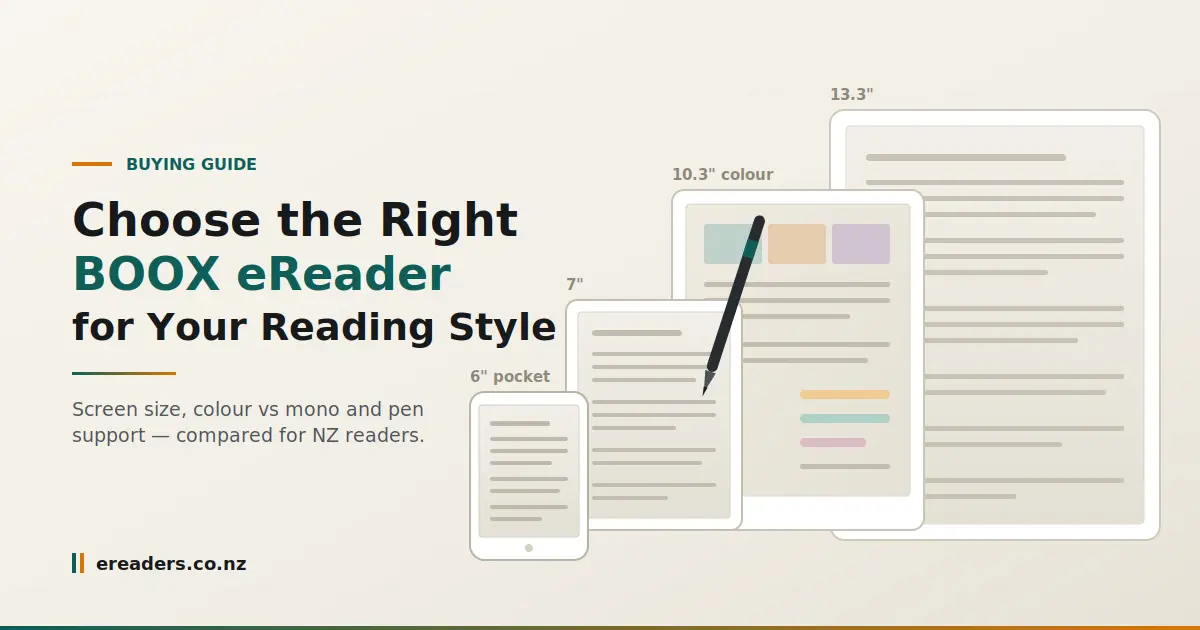
BOOX sizes cluster into four bands, and each has a clear purpose. Roughly 6–7″ for reflowable text and pocketability, 7″ colour for manga and illustrated reading, 10.3″ for PDFs and note-taking, and 13.3″ for near-full-size documents. Pick the band first, then choose within it.
| Model | Screen | Colour | Pen | Weight band | Best for |
|---|---|---|---|---|---|
| Go 6 | ~6″ | Mono | No | Lightest | Novels, travel, one-handed reading |
| Go 7 | ~7″ | Mono | No | Light | Novels with a little more page area |
| Page 7 | ~7″ | Mono | No | Light | Novel readers who want page-turn buttons |
| Palma 2 | ~6.1″ | Mono | No | Reading in gaps; phone replacement | |
| Palma 2 Pro | ~6.1″ | Mono | No | Same, with more performance headroom | |
| Go Color 7 | ~7″ | Colour | No | Light | Manga, comics, illustrated non-fiction |
| Go Color 7 Gen II | ~7″ | Colour | No | Light | Current-generation colour in a small body |
| Go 10.3 | ~10.3″ | Mono | Yes | Medium | A4 PDFs, study, note-taking |
| Go 10.3 Gen II | ~10.3″ | Mono | Yes | Medium | Same, updated hardware |
| Note Air 4C | ~10.3″ | Colour | Yes | Medium | Annotating colour documents |
| Note Air 5C | ~10.3″ | Colour | Yes | Medium | Current colour notebook flagship |
| Note Max | ~13.3″ | Mono | Yes | Heaviest | Near-actual-size PDFs, sheet music, large notebooks |
| Tab Ultra C Pro | ~10.3″ | Colour | Yes | Medium | Colour + heavier app and productivity use |
| Tab X C | ~13.3″ | Colour | Yes | Heaviest | Large-format colour work |
Why weight, not inches, decides whether you keep reading
Grams are the spec nobody compares and everybody feels. A 13.3″ device is superb on a desk and awkward in bed you’ll end up propping it on a pillow, and that friction is exactly how a device drifts into a drawer.
Be honest about your posture. If you read lying down or one-handed, weight outranks screen size. If you read at a table with the device flat, take the bigger screen and enjoy it.
Colour E Ink: who it’s for and who’s wasting money on it
Colour E Ink trades sharpness and brightness for hue. The colour filter layer sits over the panel, so colour renders at lower effective resolution than the same screen’s mono text, and the display looks slightly dimmer overall. That’s a clear win for comics, diagrams and marked-up documents and a downgrade for plain novels.
If you read text, buy mono. You’ll get crisper letterforms and a brighter page for less money. If a meaningful share of your reading is visual graphic novels, textbooks with charts, design references, documents you highlight in three colours colour changes the experience enough to justify the premium.
What colour actually looks like in the hand
Set your expectations properly: it resembles a printed newspaper colour supplement rather than a phone screen. Matte, muted, soft. That’s the nature of the technology, not a fault in any particular model, and people who go in expecting tablet-grade saturation are reliably disappointed. People who go in expecting good print are usually delighted.
The stylus question do you actually need pen support?
Pen support adds cost and, on most models, some thickness and weight. The honest test is behavioural: if you already annotate paper books, mark up printed documents, or keep a paper notebook beside you while reading, you’ll use it constantly. If you’re buying it for a habit you intend to start, the odds aren’t good.
Worth knowing before you order: stylus inclusion varies by model and bundle, so check the listing rather than assuming. Nib wear is normal and replacement nibs are cheap treat them as a consumable like pencil lead.
What you get buying in New Zealand instead of importing
Buying locally gets you an NZD price with GST already included, domestic delivery rather than a customs wait, and cover under the Consumer Guarantees Act. Direct imports from overseas sites give you none of that and the difference only becomes visible when something goes wrong.
Picture a screen fault fourteen months in. Locally, you’re dealing with a New Zealand supplier under NZ consumer law. On an import, you’re shipping a fragile E Ink panel offshore at your own cost, in your own time, with no local recourse. The purchase prices can look similar. The situations are not comparable.
You can see the current range, NZD pricing and local support arrangements at eReaders NZ.
Pros and cons of choosing BOOX over Kindle or Kobo
In BOOX’s favour:
- Runs Android with Play Store access, so Kindle, Kobo, Libby and your note apps coexist on one device
- Screen sizes and formats nobody else builds phone-shaped, 13.3″, colour notebooks
- No lock-in to a single bookstore
- The broadest stylus and note-taking range in E Ink
Against:
- Software is less polished than Kindle’s; more settings, more choices, more to learn
- No single tightly integrated bookstore experience
- More initial setup before it feels like yours
- Model naming is genuinely confusing, which is why guides like this exist
The trade is flexibility for simplicity. If you want a device that does one thing perfectly out of the box, that’s Kindle’s territory. If you want one device that handles your library, your PDFs and your notes on your own terms, that’s the case for BOOX.
A 60-second way to land on one model
- What do you read most? Reflowable text → small mono. Fixed-layout PDFs → 10.3″ or 13.3″.
- What’s the biggest thing you read? If A4 pages appear regularly, 10.3″ is your floor.
- Do you annotate? Yes → Note or Tab. No → Go or Page and save the money.
- Is colour part of the content? Yes → Go Color 7 or Note Air 5C. No → mono, every time.
- Does it need to be pocketable? Yes → Palma 2 or Palma 2 Pro.
Still undecided? Most people land in one of three places: Go 7 for novels, Go 10.3 for PDFs and study, Note Air 5C if they want colour and a pen in one device.
FAQs
Is colour E Ink worth the extra cost?
It depends entirely on what you read. For comics, illustrated non-fiction, diagrams and multi-colour highlighting, yes. For novels and plain text, no mono gives you sharper text and a brighter page for less money.
Which BOOX screen size handles A4 PDFs without constant zooming?
10.3″ is the practical minimum for comfortable A4 reading, and 13.3″ shows a page close to actual size. Anything smaller means pinching and panning on every page, which most people abandon within a few documents.
Does the stylus come included with a BOOX?
It varies by model and bundle, so check the specific listing before ordering. Pen support is built into the Note and Tab ranges and absent from the Go and Page reading models.
Can I borrow ebooks from a New Zealand library on a BOOX?
Generally yes. Because BOOX devices run Android with Play Store access, library apps used by NZ councils can be installed the same way as any other reading app. Check your own library’s current app and lending platform, as these change.
Is a used or refurbished BOOX a good idea?
It can be sound value, particularly in the larger sizes where new pricing is steepest. Ask about screen condition, battery health and what warranty applies to the unit a used device from a local supplier with stated cover is a different proposition from a private sale.
How often does BOOX release new models should I wait?
BOOX iterates quickly, which is why several models appear in both original and Gen II form. There’s almost always something newer coming, so waiting is an endless game. Buy when your current reading is being held back, not when the release calendar says so.