Your e-reader ran flat on the bus. You pull it out and the page you were on is still sitting there on the screen, perfectly legible, with a dead battery behind it.
How Does E Ink Use Less Battery
A phone would be black glass. That difference is the whole answer to how E Ink uses less battery and once you understand why the page survives with no power, the rest of it makes sense, including why your device might not be lasting the weeks the reviews promised.
The short answer: it only uses power when the page changes
An LCD or OLED screen has to be continuously lit and continuously refreshed to show anything at all. E Ink moves physical pigment into position and then leaves it there. Holding a static page costs essentially nothing, so power is consumed per page turn rather than per minute.
That single design difference is worth more than any battery capacity.
Why a dead e-reader still shows a page
The technical property is bistability, and it’s the thing almost no consumer article names.
An E Ink screen contains millions of microcapsules holding black and white pigment particles with opposite electrical charges. Apply a charge and the particles rearrange dark to the surface, or light. Remove the charge and they stay exactly where they were put.
There’s nothing holding the image in place. It isn’t being refreshed, redrawn or lit. The pigment is simply sitting there, the same way ink sits on paper. Which is why a flat battery leaves the last page visible, and why a device in a drawer for a month still shows what you were reading.
What actually happens during a page turn
A brief electrical pulse rearranges the particles into the new pattern. Then the power stops.
That pulse is your entire energy cost per page. Not per second of reading per page. A reader who spends twenty minutes on one page uses the same energy as one who glances at it for ten seconds.
Where an LCD spends its power instead
Useful contrast, because it explains the size of the gap.
A backlit screen spends power in three places, all of them continuously:
- The backlight, which must stay on for the image to be visible at all
- The refresh cycle, redrawing the image 60 or more times a second even when the image isn’t changing
- The processor, driving all of that
A phone showing a completely static page of text is working as hard as a phone showing video. It has no way to “hold” an image.
The backlight is the biggest single drain
It’s why phone battery life collapses at maximum brightness outdoors, and why turning brightness down is the first advice anyone gives.
An E Ink screen has no backlight. It reflects whatever light is already around it, exactly like paper which is also why it reads so well in sunlight and why it needs a lamp in a dark room, just like a book.
Where the power actually goes
| E Ink e-reader | LCD tablet or phone | |
|---|---|---|
| Holding a static page | Essentially zero | Full backlight and refresh draw |
| Turning a page / scrolling | Brief pulse | Continuous draw regardless |
| Screen lighting | Optional front light, off by default in daylight | Backlight always on |
| Processor while reading | Near idle | Active continuously |
| Wi-Fi idle | Small, can be switched off | Usually on |
| Typical battery life | Days to weeks | Hours to a day or two |
The difference isn’t a matter of better engineering or a bigger battery. It’s structural the two technologies spend power in fundamentally different ways.
So why isn’t my battery lasting weeks?
Here’s the part the reviews skip, and probably the reason you’re reading this.
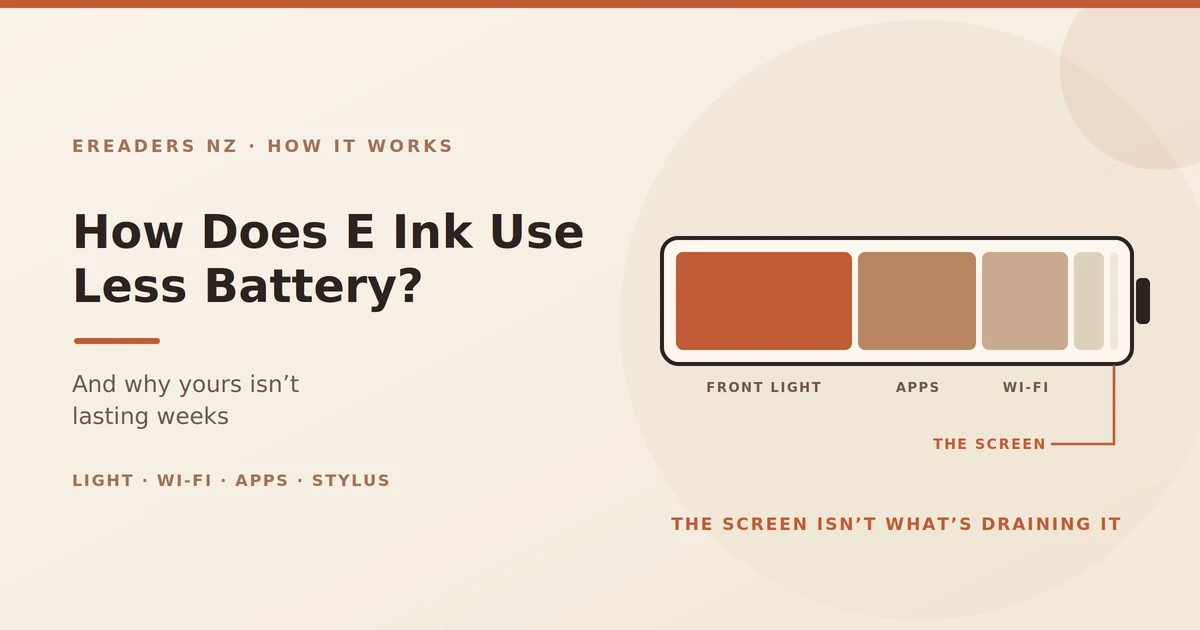
The “weeks of battery” figure describes a basic e-reader with the front light off and Wi-Fi mostly idle. If you have an Android-based device running apps, syncing to the cloud and driving a stylus, you are not running that configuration and you shouldn’t expect those numbers.
Five things account for nearly all the difference.
1. The front light
The single biggest drain on any e-reader, because it’s the one component that genuinely is powered continuously while you read.
At low levels it’s modest. At maximum it’s substantial, and it can cut a charge that would have lasted weeks down to days. In daylight you don’t need it at all turning it off outdoors is the largest single saving available to you.
2. Wi-Fi and background sync
A reader that stays connected, checks for updates and syncs a library behaves far more like a tablet than a book.
Turning Wi-Fi off between syncs costs you nothing while reading and recovers a meaningful amount of battery.
3. Android apps and the processor
This is why a BOOX running Kindle, Kobo and a browser does days rather than weeks, while a basic locked reader does weeks.
Apps keep the processor busy. They check for updates, render their own interfaces, and often assume they’re running on a device that’s plugged in every night. The flexibility is the point of an Android e-reader the battery cost is the price of it.
4. The stylus and note-taking
An active digitiser draws power whenever it’s in use. A day of handwriting consumes noticeably more than a day of reading.
5. How fast you read
Genuinely true, and almost nobody mentions it.
Since power is used per page turn, a fast reader consumes more battery than a slow one covering the same hours. Not enough to change your buying decision but enough that two people with identical devices will report different battery life and both be right.
What “weeks of battery” actually means
Realistic expectations by usage pattern rather than by model:
| How you use it | Realistic battery life |
|---|---|
| Basic reader, light off, Wi-Fi off | Several weeks |
| Basic reader, light on low, occasional sync | 1–3 weeks |
| Android reader, apps, regular sync | Several days to a week |
| Android tablet, stylus notes, always connected | 2–4 days |
None of those are bad numbers. Four days of a tablet doing real work is still several times what an iPad manages. The disappointment comes from comparing an Android e-ink tablet against a figure quoted for a basic reader.
Getting more out of a charge
In order of impact:
- Drop the front light. Use the lowest level the room allows, and turn it off entirely in daylight.
- Turn Wi-Fi off between syncs. Sync a batch of books, then disconnect.
- Restrict background apps. On Android devices, limit background activity to the two or three that genuinely need it.
- Set a short sleep timer. Sleeping costs nothing, because the page holds itself. There’s no reason for the device to stay awake.
- Charge before a long trip rather than relying on a partial charge, particularly if you’re heading somewhere without power.
Why this matters in practice
Beyond the specification-sheet satisfaction, three situations where it’s genuinely useful:
Long trips. A flight to Europe, or a bus from Auckland to Wellington, with no charger and no anxiety about it.
A weekend at a bach. Somewhere with limited power, where a device that needs nightly charging becomes an annoyance.
Outages. New Zealand storms take power out regularly, particularly in the north and on the West Coast. A reading device that runs for days on its existing charge is one thing you don’t have to think about while the grid is down.
The trade-offs that come with it
Low power isn’t free. The same engineering decision that gives you weeks of battery is what gives you the limitations:
- Slow refresh. Rearranging physical pigment takes time. Scrolling and animation look poor and always will.
- No video. Same reason.
- Colour is muted. Colour e-ink adds a filter layer over the screen, which reduces brightness and adds cost.
- Ghosting. Faint traces of the previous page can persist, since the display isn’t constantly redrawing itself.
These aren’t bugs to be fixed in a future model. They’re the other side of the property that makes the battery last a screen that holds an image without power is also a screen that takes effort to change.
FAQs
Why does my e-reader still show a page when the battery is dead?
Because E Ink is bistable the pigment particles stay physically where they were placed with no power applied. The image isn’t being held by electricity, so it survives a flat battery.
How long does an e-reader battery actually last?
Weeks for a basic reader with the light off, and several days for an Android-based device running apps and syncing. The “weeks” figure in reviews describes the first configuration, not the second.
Does the front light drain the battery?
Yes, it’s the single biggest drain on an e-reader, because it’s continuously powered while you read. Lower settings make a substantial difference, and in daylight you don’t need it at all.
Why is my BOOX battery draining faster than a Kindle?
An Android device running apps, syncing to cloud services and supporting a stylus uses far more power than a locked reader doing one job. That’s the cost of the flexibility, not a fault.
Does leaving it on standby use power?
Very little. The screen costs nothing to hold a page, though the device still draws a small amount for memory and its clock. Over months you’ll see a slow drop even untouched.
Does turning pages faster use more battery?
Slightly, yes. Power is consumed per page turn rather than per minute, so a fast reader uses marginally more than a slow one over the same number of hours.
Will the battery degrade over time?
Like any lithium battery, capacity reduces gradually with charge cycles. Because e-readers are charged so infrequently, they accumulate cycles far more slowly than a phone does.
The bottom line
E Ink uses less battery because it only spends energy when the page changes. Everything else the sunlight readability, the weeks between charges, the page that survives a flat battery comes from that one property.
If yours isn’t lasting as long as you expected, it’s almost always the front light, Wi-Fi, or background apps rather than a fault. Turn the light down, disconnect between syncs, and restrict what’s running in the background.