You want an eReader. Everyone says Kindle. And you’ve got a nagging sense that “everyone says” isn’t quite the same as “right for you.”
It sometimes is. But the best eReader in New Zealand depends on three questions almost nobody asks before buying what you read, where you read it, and whether you write on it. Answer those and the choice narrows fast, often to something cheaper than you were about to buy.
Best eReaders in New Zealand 2026
The short answer
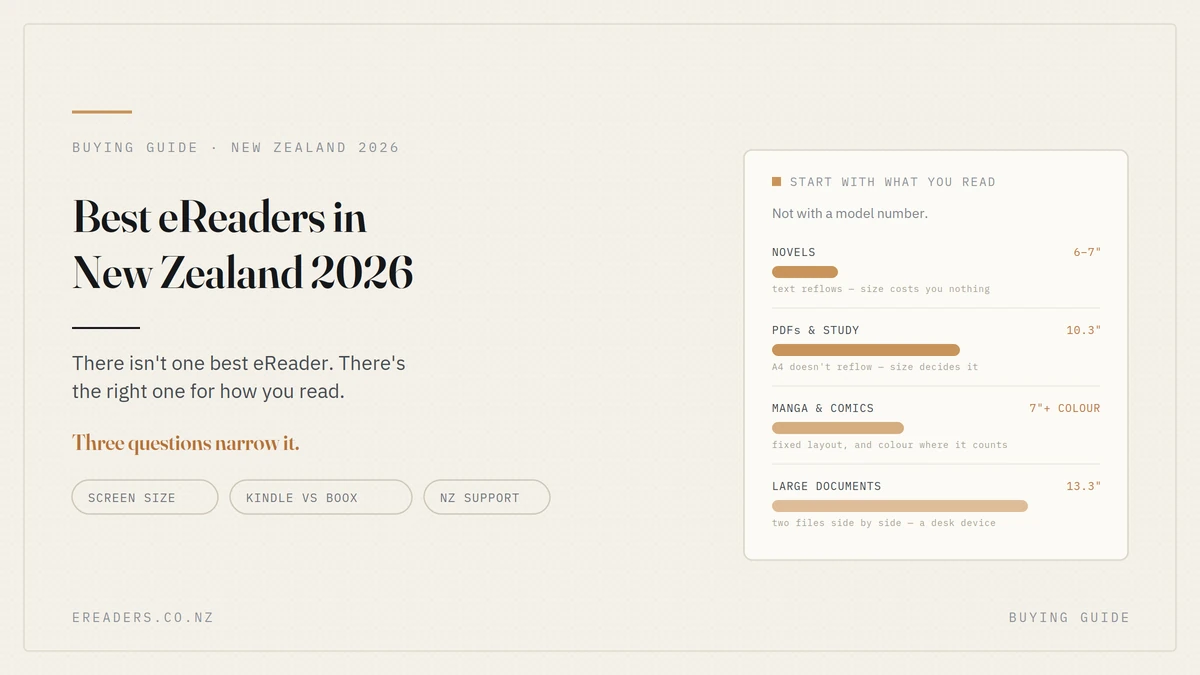
Novels, and not much else? A small monochrome device a Kindle, a Kobo, or a 6–7 inch BOOX. Buy on comfort, not features.
PDFs, study or note-taking? A 10.3-inch Android device with stylus support.
Manga and comics? Colour, at 7 inches or larger.
Replacing phone reading? Something phone-sized that fits the same pocket.
Three questions that decide it
Work through these before you look at a single product page.
1. What do you read?
- Novels and general prose text reflows to any screen, so size barely matters. You have the most freedom here.
- PDFs, journal articles, contracts fixed layout. Size matters enormously.
- Manga and comics fixed layout and image-based. Size and colour both matter.
- A mix the largest thing you read regularly should decide it.
2. Where do you read?
- In bed light and one-handed wins
- Commuting pocketable, and sunlight readability if you wait outdoors
- At a desk size is free; take the larger screen
- Outdoors any E Ink device beats any tablet
3. Do you write on it?
If you annotate, take notes or sketch, you need stylus support and that rules out most of the entry-level market immediately. If you only read, a stylus is money spent on a feature you’ll never use.
| Your answer | Category | Size |
|---|---|---|
| Novels, in bed or commuting | Monochrome reader | 6–7″ |
| Novels, but I want one device for everything | Android reader | 7″ |
| PDFs and study, with notes | Android tablet with stylus | 10.3″ |
| Manga and comics | Colour | 7″+ |
| Large documents, two files at once | Android tablet | 13.3″ |
| Replacing phone reading | Pocket device | Phone-sized |
Screen size: the decision people underthink
It matters more than any spec on the box, and it’s the one people consider last.
6–7 inch
Novels, one-handed, pocketable. Text reflows to fit, so a smaller screen costs you nothing but page turns.
If you read prose and nothing else, this is the size and it’s cheaper and lighter than what you were probably considering.
10.3 inch
The size that makes A4 documents work. Journal articles, contracts, scanned course readings all display at close to native size instead of forcing you to pinch and pan.
This is the note-taking size too. Bag device rather than pocket device.
13.3 inch
Large-format documents with room for margins, or two files genuinely side by side. Technical drawings, sheet music, legal work.
A desk device. Know that before you buy one intending to carry it daily.
Phone-sized
The pocket category. Fits where your phone fits, reads like paper, and doesn’t deliver notifications. Excellent for prose; tight for anything fixed-layout.
Our guide to choosing by reading style goes deeper on matching size to habits.
Kindle, Kobo or BOOX?
Each wins at something genuinely different. Here’s the honest version.
Where Kindle wins
Simplicity and ecosystem. If your library is already in Kindle, you want it to just work, and you read novels a Kindle is a perfectly good answer and often the cheapest entry point.
There’s no shame in the obvious choice being the right one.
Where Kobo wins
Strong library integration and better open-format support than Kindle, without Android complexity. If you borrow heavily from libraries and want something simple, it’s worth a look.
Where BOOX wins
Android with Google Play, which is the structural difference. It means Kindle, Kobo, Libby and every other bookstore’s app runs on the same device you’re not choosing a bookstore when you choose hardware.
Also: proper PDF handling, stylus support, sizes up to 13.3 inches, and colour options. It’s the answer when you read outside one ecosystem, work with documents, or write on your device.
| Kindle | Kobo | BOOX | |
|---|---|---|---|
| Ecosystem | Amazon | Kobo + libraries | Open — any app |
| Formats | Limited | Good | Broadest |
| PDF handling | Basic | Better | Best |
| Note-taking | Limited models | Limited models | Across the range |
| Sizes available | Small to mid | Small to mid | 6″ to 13.3″ |
| Colour options | Limited | Some | Several |
| Locked in? | Yes | Partly | No |
| Best for | Simplicity | Library readers | Flexibility, PDFs, notes |
The honest summary
If you read Kindle novels and want it simple, buy a Kindle. We stock BOOX and we’d still tell you that.
If you read PDFs, use more than one bookstore, borrow from libraries and buy, or write on your device that’s where Android devices pull clearly ahead, and it’s a difference you’ll feel weekly rather than occasionally.
The categories, and what suits each
The novel reader
Small, light, front-lit. You want something comfortable in one hand for an hour and pocketable enough to carry without thinking.
Ignore: storage, processor, colour. None of them will affect your reading.
Spend on: front light quality, weight, and how it feels to hold.
The student or professional
10.3 inches, stylus support, and a workflow that gets notes off the device.
The question that decides whether it sticks isn’t the pen it’s export and sync. Our guide for students covers the workflow, and the work, study and entertainment post covers device selection.
The manga or comic reader
Colour, at 7 inches for manga or 10.3 for Western comics, since those are full-page colour art.
One honest note: most manga is black-and-white line art, and that renders sharper on a 300 PPI monochrome screen than a 150 PPI colour one. Our colour eReader guide explains when colour genuinely earns its place.
The pocket reader
Phone-sized, for people who’ve admitted their phone isn’t working as a reading device. Same pocket, same one-handed grip, none of the pull.
What’s changed for 2026
Less than the marketing suggests, and that’s genuinely good news.
Refresh handling has improved across the board scrolling and page turns feel noticeably smoother than devices from a few years ago.
Colour E Ink has matured rather than transformed. Still muted, still dimmer than monochrome, still best for content where colour carries meaning.
Android versions are more current on the flexible devices, which matters for app compatibility.
What hasn’t changed: E Ink still can’t do video, colour is still a trade-off against brightness, and screen size still decides more than any other spec. The fundamentals of choosing well are the same as they were three years ago.
What to ignore when comparing
Four specs that get weighted far too heavily:
Storage capacity. Novels are under 1MB. Even a modest device holds thousands. It only matters for manga, scanned PDFs and audiobooks covered in our storage guide.
Processor speed. You’re turning pages, not rendering video. Beyond a basic threshold it changes nothing you’ll notice.
Waterproofing. Genuinely useful if you read in the bath or at the beach. Irrelevant to most people, and often the reason a device costs more.
Headline colour counts. 4,096 colours sounds impressive. What matters is that colour E Ink is muted and dimmer than mono the number doesn’t change that.
Buying in New Zealand
Worth stating plainly, because it’s a real cost difference rather than a sales line.
Local purchase means Consumer Guarantees Act cover, a warranty someone here honours, and support you can reach in your own timezone. If something’s faulty, it’s a conversation rather than an international shipping exercise.
Overseas purchase can look cheaper on the sticker. Add shipping, currency conversion, potential duties, and the cost of returning a faulty device offshore and the gap usually narrows or reverses.
The question worth asking of any seller: who honours the warranty, and where does the device go if it fails?
FAQs
What’s the best eReader in New Zealand?
There isn’t one there’s the best one for how you read. Novels suit a small monochrome device; PDFs and note-taking need 10.3 inches with a stylus; manga and comics benefit from colour. Start with what you read, not with a model.
Is a Kindle better than a BOOX?
Different strengths. Kindle is simpler and cheaper at entry level with a tight ecosystem. BOOX runs Android with Google Play, so any bookstore’s app works, and it handles PDFs and note-taking far better. If you only read Kindle novels, a Kindle is fine.
What size eReader should I buy?
6–7 inches for novels, since text reflows and you lose nothing. 10.3 inches if you read A4 PDFs, because those don’t reflow. 13.3 inches only for large-format documents at a desk.
Are colour eReaders worth it?
For manga, comics and illustrated material, yes. For prose, no colour E Ink is dimmer and lower resolution in colour, and text gains nothing.
Can I read library books on any eReader?
Not on all. Kobo has strong library integration, and Android-based devices can install Libby directly. Kindle handles library loans differently depending on region. Check before buying if borrowing matters to you.
Do I need a stylus?
Only if you write. If you read and never annotate, it’s a feature you’ll never use. If you annotate PDFs or take notes, it changes what the device is for.
Is it worth buying from overseas?
Often less than it appears once you add shipping, conversion and the risk of returning a faulty unit internationally. Local purchase also brings Consumer Guarantees Act cover, which an overseas seller can’t offer.