You’ve been reading manga on your phone at night. The screen’s too bright, the panels are too small, and you’ve started holding it further away than you used to.
Colour E Ink solves the first problem properly. Choosing the best colour eReader for comics, manga and PDFs is mostly about the second one screen size and about one trade-off nobody mentions until after you’ve bought.
Here’s the honest version.
Best Colour eReaders in New Zealand
The short answer
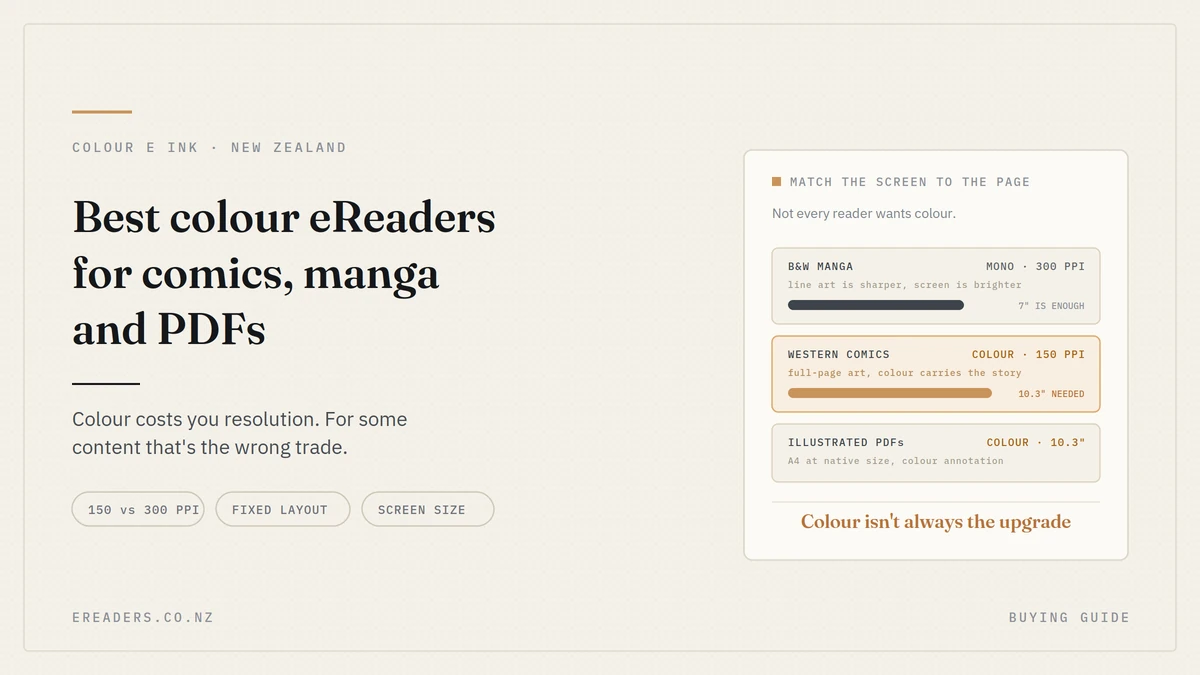
For manga, a 7-inch colour model handles most content well. For Western comics and illustrated PDFs, 10.3-inch is the size that works, because those are full-page colour art at fixed layout.
And the trade-off to understand first: colour E Ink is dimmer and lower-resolution than monochrome E Ink. That matters more for some content than others.
What colour E Ink actually gives you and costs you
Worth understanding before you spend anything, because it explains every recommendation below.
How it works
A colour E Ink screen is a monochrome layer with a colour filter array on top. Light enters through the filter, reflects off the pigment beneath, then passes back out through the filter again.
It loses brightness twice on that journey. That’s not a manufacturing flaw it’s inherent to putting a filter over a reflective display.
The resolution split
This is the specification that matters most and it’s rarely explained:
- 300 PPI in black and white
- 150 PPI in colour
Colour is produced by combining sub-pixels, so effective resolution halves when colour is involved. Black text and line art stay sharp; coloured areas are softer.
The brightness cost
Compared with a monochrome E Ink screen of the same generation, colour is:
- Dimmer, so you’ll use more front light
- Less battery-efficient, mostly because of that front light
- Softer on coloured content
- More expensive
None of that makes it a bad screen. It makes it a screen with a specific purpose. Our comparison of E Ink, LCD and OLED goes deeper into the underlying technology.
What it’s genuinely good at
- Western comics — full-colour art where colour carries the story
- Manga covers and colour inserts
- Full-colour series and webtoons
- Illustrated textbooks and reference material
- Colour-coded annotation on PDFs
- Magazines and charts
The insight that complicates the obvious answer
Here’s the thing most guides won’t tell you on a page selling colour devices.
Most manga is black-and-white line art. And black-and-white line art looks better on a 300 PPI monochrome screen than on a 150 PPI colour one.
If you read mostly manga
A high-quality monochrome device may genuinely serve you better. It’s brighter, sharper on line art, cheaper, and lasts longer on a charge.
You’d give up colour covers and the occasional colour insert. For a reader working through a long black-and-white series, that’s a small loss against a noticeably better reading experience.
This isn’t a reason not to buy colour. It’s a reason to know what you’re choosing.
When colour genuinely wins for manga
- Your series has regular colour pages, not just covers
- You read full-colour manga or webtoons
- You also read Western comics
- You annotate in colour, or read illustrated non-fiction alongside
If two or more of those apply, colour is the right call.
If you read Western comics
Colour is essential, no argument. Modern American and European comics are full-colour art where the colouring is part of the storytelling. Monochrome isn’t a compromise here it’s a different, worse experience.
Screen size: the bigger decision
For fixed-layout content, size matters more than colour does.
Why fixed layout changes everything
Text reflows. A novel on a 6-inch screen shows the same words as on a 10-inch screen, just with more page turns.
A comic page is an image. It doesn’t reflow. On a smaller screen you’re either reading it small or panning around it panel by panel and neither is how the artist intended it to be read.
7-inch
Works well for manga. Pages are portrait-oriented and roughly proportional to a 7-inch screen, so a full page is readable without zooming.
Western comics on 7 inches means zooming or panel-by-panel viewing. Some readers are fine with that; most find it wearing after a while.
10.3-inch
The size where Western comics work properly full pages at close to native size, illustrated PDFs readable, A4 textbooks workable.
The trade-off is weight, bulk and price. It’s a desk-and-bag device rather than something you hold one-handed for an hour.
Refresh speed and ghosting
You turn pages far faster reading comics than reading prose, and ghosting is more visible on images than on text.
Modern devices offer refresh modes that trade sharpness for speed, and for this content the faster modes are genuinely useful. A full refresh clears ghosting entirely that momentary black flash and most devices let you set how often it happens.
Being honest: E Ink will never scroll like an LCD. If you read webtoons by scrolling continuously rather than turning pages, that’s the format E Ink handles least well.
Storage, because these files are large
This is the one content type where storage genuinely matters.
- Novel: under 1MB
- Manga volume: roughly 50–150MB
- Colour comic: often 100–300MB
A hundred manga volumes is real storage in a way a thousand novels isn’t. If you’re building a library on-device rather than reading from the cloud, look for a model with microSD expansion. Our guide to eReader storage covers the calculation.
The colour models available in New Zealand
| Model | Screen | Best for | Weight class | Trade-off |
|---|---|---|---|---|
| Go Color 7 (Gen II) | 7″ colour | Manga, illustrated study | Light, one-handed | Western comics need zooming |
| Palma 2 Pro | 6.13″ colour | Manga on the go, pocket carry | Pocketable | Smallest — fixed layout is tight |
| Note Air5 C | 10.3″ colour | Western comics, illustrated PDFs, annotation | Bag device | Heavier, costs more |
| Tab Ultra C Pro | 10.3″ colour | Comics plus heavy multitasking | Bag device | Premium pricing |
| Tab X C | 13.3″ colour | Large-format art, technical colour work | Desk device | Specialist, expensive |
For manga on a budget
The Go Color 7 (Gen II) at 7 inches is the practical entry point. Portrait manga pages fit well, it’s light enough to hold, and the price is the most accessible of the colour range.
For Western comics and illustrated PDFs
10.3-inch — the Note Air5 C or Tab Ultra C Pro. This is the size where a full comic page works as drawn, and where an A4 illustrated textbook is readable rather than merely open.
For pocket reading
The Palma 2 Pro is remarkable for what it is colour E Ink in a phone-sized body. The honest caveat: at 6.13 inches, fixed-layout comic pages are tight. Superb for prose and adequate for manga; not the device for Western comics.
For large-format colour
13.3-inch suits technical drawings, large-format art and colour documents needing margin space. Genuinely specialist, and most comic readers don’t need it.
Getting comics onto the device
Straightforward, and the Android base is what makes it flexible.
- Formats: CBZ and CBR are the standard comic archive formats, both widely supported. PDF and EPUB work too.
- Transferring: USB cable, or cloud sync via Drive, Dropbox or OneDrive.
- Apps: with Google Play access you can install dedicated comic readers, plus Kindle, Kobo and manga apps.
Worth checking your specific model supports Play Store access if app flexibility matters to you.
Who should skip colour entirely
Prose readers. You gain nothing and lose brightness, sharpness and battery life. A monochrome device is the better screen for text, and cheaper.
Anyone whose manga library is predominantly black-and-white line art. As above 300 PPI mono is sharper for that content than 150 PPI colour, and brighter to read.
We’d rather tell you that than sell you a colour device you’ll find dimmer than you expected.
FAQs
Is colour E Ink good enough for manga?
Yes, and it’s a substantial improvement on reading manga on a phone. Be aware that colour resolution is 150 PPI against 300 PPI in mono so for predominantly black-and-white series, a monochrome screen is actually sharper.
Is colour E Ink as vivid as a tablet?
No. It’s reflective rather than emissive, so colours are muted compared with an LCD or OLED. What you get in exchange is sunlight readability and far less eye fatigue over long sessions.
What size do I need for comics?
Manga works on 7 inches. Western comics need 10.3 inches, because they’re full-page colour art at fixed layout and don’t reflow to fit a smaller screen.
Does colour E Ink use more battery?
Yes, mainly because the dimmer screen means you’ll run the front light more. Still measured in days rather than hours, but noticeably less than an equivalent monochrome device.
Can I read webtoons on an eReader?
You can, though webtoons are designed for continuous scrolling and that’s the interaction E Ink handles least well. Faster refresh modes help; it won’t match a phone for smoothness.
Do I need colour if I read mostly black-and-white manga?
Probably not. Monochrome at 300 PPI renders line art more sharply and reads brighter. You’d lose colour covers and inserts worth weighing against a better everyday reading experience.
What file formats do comics use?
CBZ and CBR are the standard archive formats and both are widely supported, alongside PDF and EPUB. Files are large 50 to 300MB per volume so storage matters more here than for any other content type.