Take your phone outside on a bright Auckland afternoon and the screen washes out. Take an e-reader outside and it gets better. Same sun, opposite result.
That single difference is the whole story. Understanding how E Ink technology works comes down to one idea: your phone makes light, and an e-reader doesn’t. It moves physical particles around and then lets the sun or your lamp do the rest the same way a paperback does.
Everything else people notice about e-readers the black flash between pages, the faint ghost of the last page, weeks of battery, the slightly disappointing colour falls out of that one design choice. Here’s how.
How does E Ink technology work?
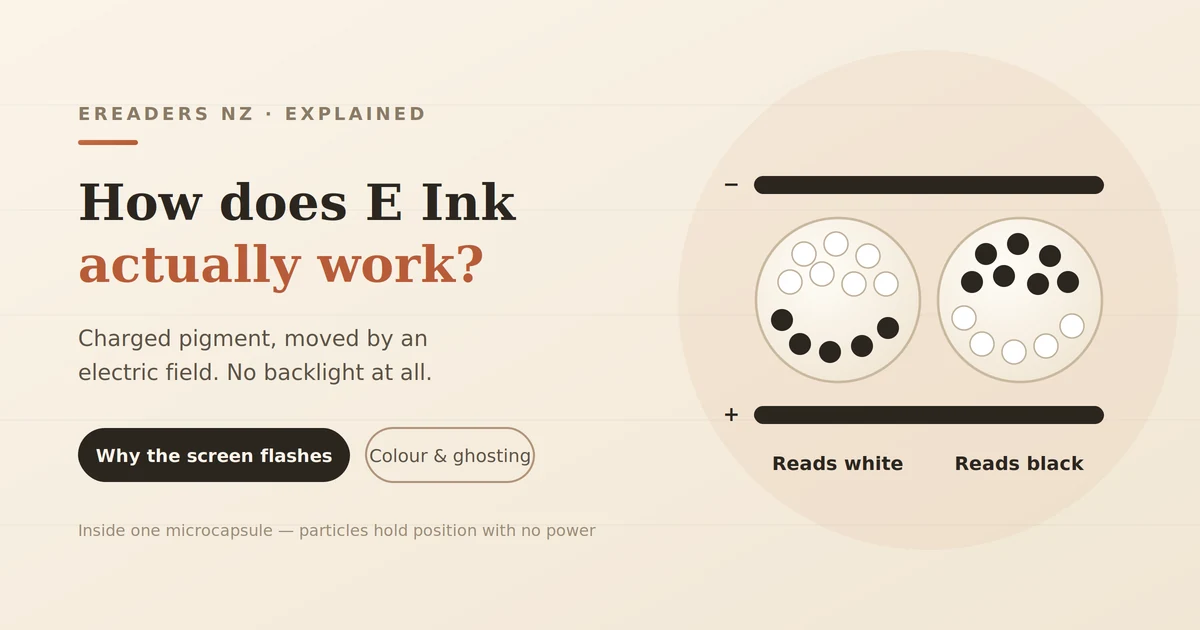
An E Ink screen contains millions of microscopic capsules filled with clear fluid and two kinds of pigment particle: white ones and black ones, carrying opposite electrical charges. When the device applies an electric field to a capsule, it pulls the chosen colour to the top surface and pushes the other down out of sight.
The particles are laminated in a single layer onto a film, which is then laminated onto a transistor layer that addresses each pixel individually. No backlight sits behind any of it.
You’re looking at actual pigment sitting at the top of a capsule, reflecting whatever light is in the room. The screen doesn’t glow. It’s ink, moved electrically instead of printed.
The technology came out of the MIT Media Lab and is proprietary to E Ink Corporation, which is why nearly every e-reader on the market Kindle, Kobo, BOOX uses panels from the same supplier. The differences between brands are in the software, the frontlight and the case, not the ink.
Bistability: the property that explains everything else
Here’s the part most explanations skip. Once those particles move into position, they stay there with no power at all. The technical name is bistability, and power is only consumed to change an image, not to hold one.
Sit an e-reader on a table with a page displayed, walk away for a week, come back. The page is still there. If the battery had died in the meantime, the page would still be there.
That one property drives almost everything you experience:
- Weeks of battery life, because the screen costs nothing between page turns. (The frontlight and Wi-Fi are a different matter that’s covered in our guide to how long an e-reader battery actually lasts.)
- The black flash, because clearing particles that want to stay put takes deliberate effort.
- Slow page turns, because you’re physically moving matter rather than switching a light on and off.
- No flicker, because there’s nothing refreshing 60 times a second.
An LCD has to redraw constantly just to show you a static page. E Ink draws once and stops.
What’s actually inside the screen
An E Ink module is a stack of thin layers: a transistor backplane at the back, the ink layer above it, a protective sheet on top, and on most modern readers a frontlight and a touch layer.
The TFT backplane
Underneath the ink sits a thin film transistor array: a grid of tiny switches, one per pixel, that lets the device apply a charge to precisely the capsules it wants to change. This is what makes high-resolution text possible rather than a screen that can only flip between two whole images.
It’s the same basic addressing idea an LCD uses. The difference is what sits on top of it.
The microcapsule ink layer
The capsules themselves are roughly the diameter of a human hair. Each pixel covers several of them, and the device can give a capsule a partial charge to bring up a mix of black and white particles which is how you get grey. E Ink panels in e-readers typically render 16 levels of greyscale, giving a contrast ratio comparable to a paperback page.
The frontlight, not a backlight
This distinction matters more than it sounds. An LCD puts its light source behind the screen and shines it through at your eyes. An e-reader puts LEDs around the edge of the screen and points them inward across the surface, so the light bounces off the ink and then reaches you.
It’s the difference between a lamp pointed at your face and a lamp pointed at your book.
Most current devices also include amber LEDs alongside the white ones, so you can shift the light warmer at night.
The touch layer
Touchscreens are added either as a capacitive layer on top of the display for finger input, or as a digitiser sitting beneath the transistor layer for stylus input on note-taking devices. Neither approach reduces the screen’s reflectivity, which is why a touchscreen e-reader looks no dimmer than one without.
Why your e-reader flashes black when you turn the page
That full-screen black flash is the device deliberately resetting every capsule. Because particles hold position without power, leftovers from the previous page can linger as a faint shadow ghosting. A full refresh clears the panel entirely so the next page starts clean.
Most readers don’t do this on every page turn. They use a partial refresh changing only the capsules that need to change and then run a full refresh every few pages to clear accumulated ghosting.
Nearly every device lets you adjust that interval:
- Refresh every page: cleanest text, most flashing, marginally more battery use.
- Every 5–10 pages: the usual default, and a reasonable balance.
- Rarely or never: almost no flashing, but ghosting builds up visibly, especially with images.
If you’re reading plain novels, a longer interval is fine. If you’re reading PDFs, comics or anything image-heavy, shorten it images leave far more residue than text.
Reflective vs emissive: sunlight and darkness
E Ink is a reflective display, which is why it stays readable in direct sunlight where phone screens fail. More ambient light means more light bouncing off the pigment, so contrast actually improves as conditions get brighter.
The flip side is unavoidable. No ambient light, no image. In a dark room an E Ink screen is as invisible as a book which is precisely why frontlights were added.
This is worth understanding before you buy, because it inverts how you think about screen brightness. On a phone, you turn brightness up outdoors. On an e-reader, you turn the frontlight off outdoors, because the sun is doing the work for free.
E Ink vs LCD and OLED compared
| E Ink | LCD | OLED | |
|---|---|---|---|
| Light source | Ambient (reflective) | Backlight through panel | Pixels emit their own light |
| Power when static | None | Continuous | Continuous |
| Direct sunlight | Improves | Washes out | Washes out |
| Refresh rate | Under 1 second per page | 60Hz+ | 60Hz+ |
| Colour | Limited, muted | Full, vivid | Full, deepest contrast |
| Flicker | None | Possible (PWM dimming) | Possible (PWM dimming) |
| Best at | Long-form reading, static content | General use, video | Video, dark-room viewing |
There’s no winner here. These are different tools. An E Ink panel is a poor choice for watching anything and an excellent choice for reading for three hours.
How colour E Ink works and why it looks muted
Most colour e-readers use a colour filter array laid over a standard black-and-white E Ink panel. The pigment underneath is still just black and white; the filter tints the reflected light to produce colour.
That approach has two unavoidable costs. Light passes through a filter on the way out, so colour looks softer and more washed than a printed page. And because several filtered sub-pixels combine to make one colour pixel, colour resolution is lower than the same panel’s black-and-white resolution.
Manage your expectations accordingly. Colour E Ink looks like a newspaper colour supplement, not a magazine perfectly good for comics, book covers, highlighted notes and charts, underwhelming if you’re expecting tablet colour. A separate panel family used in retail signage produces far richer colour but refreshes too slowly for reading.
The eye-strain and blue-light claim, honestly
This deserves a straight answer, because a lot of retailers overstate it.
What’s genuinely true: the panel emits no light of its own. You’re reading reflected light, the same as paper. There’s no backlight shining into your eyes, and no PWM flicker from the display itself. If screen flicker or glare bothers you, E Ink removes both.
What’s overstated: “no blue light” isn’t accurate on a device with a frontlight switched on. Those are LEDs, and they emit light including blue wavelengths which is exactly why warm-light settings exist. With the frontlight off, the claim holds. With it at 80% at midnight, you’re looking at LEDs.
What’s unproven: claims that E Ink prevents eye strain or protects your eyesight. Many readers report less fatigue during long sessions, and the absence of flicker and glare is a reasonable explanation. That’s a sensible expectation, not a medical outcome.
Buy one because reading on it is more comfortable. That’s a good enough reason on its own.
Where else you’ll find E Ink
E-readers are the most visible use, not the only one:
- Supermarket shelf labels thousands per store, updated wirelessly, running for years on a coin cell
- Bus stop and rail signage, readable in daylight and cheap to power
- Hospital and office wayfinding boards
- Note-taking tablets with stylus digitisers
- Watch faces and luggage tags
The common thread is content that changes occasionally and then sits still. That’s the job bistability was built for.
What E Ink is genuinely bad at
Worth being clear about, because the wrong expectations cause most of the disappointment:
- Anything moving. Video, animation and fast scrolling are outside what the technology does well.
- Vivid colour. See above.
- Rapid interaction. Typing on an E Ink keyboard works but feels laggy compared with a tablet.
- Point pressure. The panel is a thin laminated stack. A hard press with a thumbnail or a key in a bag can crack it, and a cracked E Ink panel is not repairable it’s a screen replacement.
- Cost per inch. Large E Ink panels are expensive compared with LCDs of the same size.
If you want one device for reading, video and browsing, buy a tablet. If you want to read for hours without eye fatigue, buy an e-reader. Trying to make either do the other’s job is how people end up disappointed with both.
FAQs
Does E Ink use power when the screen is on?
Only when the image changes. Holding a page costs nothing, which is why an e-reader can show a screensaver indefinitely on a dead battery.
Why does my e-reader screen flash black?
It’s clearing the panel to remove ghosting from the previous page. Normal behaviour, and adjustable in your refresh settings.
Is E Ink better for your eyes than a tablet?
It removes glare and screen flicker, which many readers find more comfortable over long sessions. That’s a comfort advantage rather than a proven health benefit and the frontlight still emits light when it’s switched on.
Can E Ink display video?
Technically yes on some panels, poorly. The refresh rate is far too slow for watchable motion; it isn’t what the technology is designed for.
Why is colour E Ink so dull compared to a tablet?
Colour comes from a filter layer over black-and-white ink, so light is lost passing through it. Expect newspaper-quality colour, not tablet colour.
Does E Ink work in direct sunlight?
Yes, better than in dim light. It reflects ambient light, so brighter conditions improve contrast the opposite of a phone.
See it rather than read about it
Descriptions only get you so far with a display you have to look at. The difference between an E Ink panel and a tablet screen is obvious within about ten seconds of holding one, and impossible to judge from a product photo especially colour, which never photographs the way it looks.