Two models, side by side. One has 32GB, the other has 64GB, and there’s a price gap between them. Nothing on either product page tells you whether that difference will ever matter to you.
How Much Storage Do You Need in an eReader
For most people, it won’t. The honest answer to how much storage you need in an eReader is less than you think a modest device holds more novels than you’ll read in a lifetime. But there are four situations where storage becomes a genuine decision, and if you’re in one of them, it’s worth getting right.
The short answer
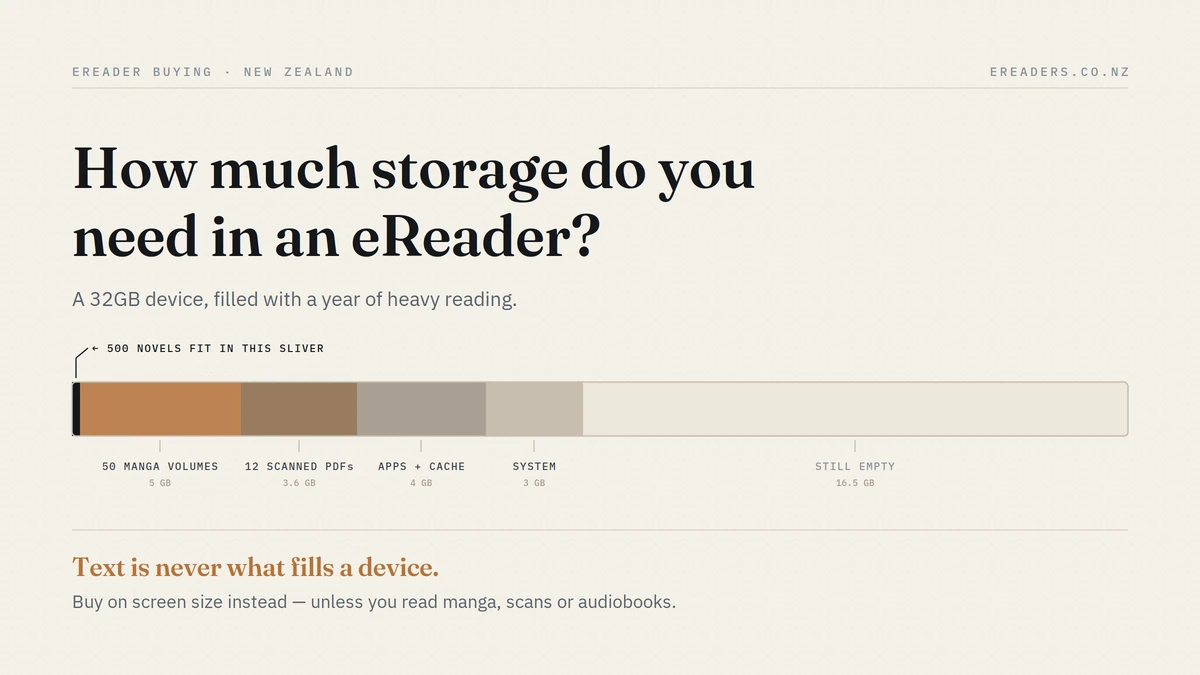
For reading novels, almost any modern eReader has more storage than you’ll ever fill. A 32GB device holds thousands of books.
Storage only becomes a real consideration if you read manga or comics, work with scanned PDFs, keep audiobooks on the device, or install a lot of Android apps.
Why novels are effectively free
The numbers make this obvious once you see them.
What a book actually weighs
A typical EPUB novel is somewhere between 300KB and 1MB. Some are smaller. A long book with a few illustrations might reach 2 or 3MB.
So in 1GB you could fit roughly a thousand novels. In 8GB, around eight thousand. Most people’s entire lifetime reading list is a few hundred books.
If you read prose, you will not run out of space. That’s not a marketing claim it’s arithmetic.
The mistake people make
We’re all conditioned by phone storage, where photos and video dominate and 128GB fills within a year or two. Text is a completely different order of magnitude.
A single minute of 4K video is larger than a hundred novels. That’s the comparison worth holding in your head.
What this means for your buying decision
If you read prose, take storage off your comparison list entirely and decide on the things you’ll notice every day screen size, weight, front light quality, and whether it fits in a pocket.
Our guide to choosing a BOOX for your reading style approaches the decision from that angle.
The four things that actually fill an eReader
Here’s where the sizes diverge sharply.
| Content type | Typical file size | Roughly how many in 8GB | In 32GB |
|---|---|---|---|
| Novel (EPUB) | 0.3–1 MB | ~10,000+ | ~40,000+ |
| Illustrated ebook | 5–20 MB | ~500 | ~2,000 |
| Manga volume | 50–150 MB | ~60–150 | ~250–600 |
| Comic (CBZ, colour) | 100–300 MB | ~30–80 | ~120–300 |
| Native PDF (text) | 1–10 MB | ~1,000 | ~4,000 |
| Scanned PDF textbook | 50–500 MB | ~20–150 | ~70–600 |
| Audiobook (per hour) | 30–60 MB | Varies by length | Varies |
| Android app | 20–200 MB | — | — |
Figures are ranges because they vary enormously with compression, scan quality and page count.
Manga and comics
These are image files in a container, not text. A single manga volume can be the size of a hundred novels, and a colour comic larger still.
If you’re building a manga library on-device, this is the one content type where storage genuinely runs out and it’s the group who should prioritise it when buying.
Scanned PDFs versus native PDFs
This distinction matters more than any other on the page, and nobody explains it.
A native PDF was created digitally from a text document. The pages are text, so files are small a 300-page report might be 2MB.
A scanned PDF is a photograph of each page. Every page is an image, so the same 300 pages could be 200MB or more.
Same page count. A hundred times the size. If you’re a student wondering whether storage matters, this is the question to answer: are your course readings native or scanned? Older journal archives and library scans are usually the latter.
Audiobooks
Roughly 30–60MB per hour depending on quality. A ten-hour audiobook is somewhere around 300–600MB comparable to several hundred novels.
A handful of audiobooks kept on-device is real storage in a way that a hundred ebooks isn’t.
Android apps and their cache
The one nobody accounts for, and on Android-based BOOX devices it’s usually the actual culprit.
Play Store apps themselves take 20–200MB each. But the bigger consumer is what they store: your downloaded Kindle library, Libby loans waiting to be read, cached covers, and app data that accumulates quietly over months.
Someone with ten apps installed and a few dozen downloaded books across them can be using several gigabytes without ever having sideloaded a single file.
The storage you don’t get
Advertised capacity isn’t available capacity. The operating system and preinstalled apps take a share before you copy anything across.
This is true of every device from every brand it’s not a BOOX quirk or a marketing trick. But it does mean a 32GB device doesn’t offer 32GB of usable space, and it’s worth knowing when you’re calculating.
Practical implication: don’t buy with zero headroom. If your calculation says you need exactly 30GB, buy the next size up.
Do you need expandable storage?
A microSD slot changes the calculation completely a card can cost less than the price difference between two capacities, and you can swap it.
But it’s model-dependent, and it’s a spec to confirm before you buy rather than discover afterwards.
Who genuinely needs it
- Manga and comic readers building a collection
- Students working with scanned course material
- Anyone keeping audiobooks on the device rather than streaming
- People with large sideloaded libraries they want available offline
Who doesn’t
Prose readers, and anyone using cloud sync. If your books live in Kindle, Kobo or Libby and download on demand, the device only ever holds what you’re currently reading.
What to check before buying
- Whether your chosen model has a slot at all
- Maximum supported card size
- Whether apps can be moved to the card, or only media files
How to work out your own number
Four steps, and most people finish at step one.
- List what you’d actually keep on the device: not everything you own. Be honest about how much of your library you’d genuinely want offline.
- Weigh it by content type using the table above. Novels round to nothing; manga and scanned PDFs dominate.
- Add app overhead if it’s an Android model: a few gigabytes is a reasonable allowance for apps and their downloaded content.
- Add headroom. Devices behave badly when nearly full, and you’ll accumulate more than you plan to.
The library misconception
Most people assume they need their entire collection on the device. You almost certainly don’t.
With cloud-connected apps, your library lives in the service and downloads when you open it. The device holds what you’re reading now and what’s next which is a fraction of what you own.
Sideloading is the same story: keep the master library on a computer, copy across what you want to read.
Storage by reader type
The novel reader. Any capacity works. Buy on screen size, weight and front light instead you will not fill it.
The student. It depends entirely on whether your course readings are native or scanned PDFs. Check a few of your existing files before deciding. Scanned material argues for higher capacity or a microSD slot; native PDFs mean storage is a non-issue.
The manga or comic reader. The one group who should prioritise storage and expandability. A collection builds quickly, and image-based content is orders of magnitude larger than text.
The mixed user. Apps, audiobooks, PDFs and ebooks together. Mid-to-high capacity, and headroom matters more than a precise calculation.
Managing storage on a device you already own
If you’re already tight on space, this recovers most of it without spending anything:
- Remove finished books you’re not going to reread
- Clear app caches — on Android models this accumulates invisibly and can be surprisingly large
- Move completed manga to a computer or card
- Delete downloaded audiobooks once you’ve listened
- Uninstall apps you tried once and never opened again
- Check downloaded loans in Libby or Kindle that you’ve finished but never removed
That last one catches a lot of people. Apps download books for offline reading and don’t always tidy up afterwards.
FAQs
How many books can 32GB hold?
Tens of thousands of ordinary novels, since a typical EPUB is under 1MB. The realistic limit is a few hundred manga volumes or a few dozen large scanned PDFs text is never what fills a device.
Is 8GB enough for an eReader?
For novels, comfortably that’s thousands of books. It becomes tight if you read manga, keep audiobooks on-device, or install a lot of Android apps alongside downloaded content.
Do I need a microSD card in my eReader?
Only if you read image-heavy content or keep large offline libraries. Prose readers and anyone using cloud sync won’t need one. Check whether your chosen model even has a slot, as not all do.
How much space do manga and comics take?
A manga volume is typically 50–150MB and a colour comic can exceed 300MB roughly a hundred times a novel. Collections build fast, which is why this is the one genre where storage genuinely matters.
Why does my eReader show less storage than advertised?
The operating system and preinstalled apps use part of the capacity before you add anything. It’s normal and applies to every device and brand just don’t plan on using the full advertised figure.
Do audiobooks use a lot of storage?
Yes, relatively roughly 30–60MB per hour, so a ten-hour book is around 300–600MB. Keeping several on-device uses meaningful space. Delete them once you’ve finished.
Can I store my whole Kindle library on a BOOX?
You generally don’t need to. The Kindle app downloads books on demand and keeps your library in the cloud, so the device only holds what you’re actively reading. If you’d rather have everything offline, calculate by content type first.