Semester one starts and your reading list runs to four hundred pages. Half of it is journal articles. Your print quota covers maybe a fifth of that, and the rest is sitting in Canvas waiting.
Best eReader for Students NZ
Choosing the best eReader for students in New Zealand comes down to one question almost every buying guide skips: what format do your readings actually arrive in? Get that right and the decision is straightforward. Get it wrong and you’ll spend $300 on a device that can’t display a single one of your course readings properly.
What’s the best eReader for students in New Zealand?
There isn’t one answer there are two, and your course decides which applies.
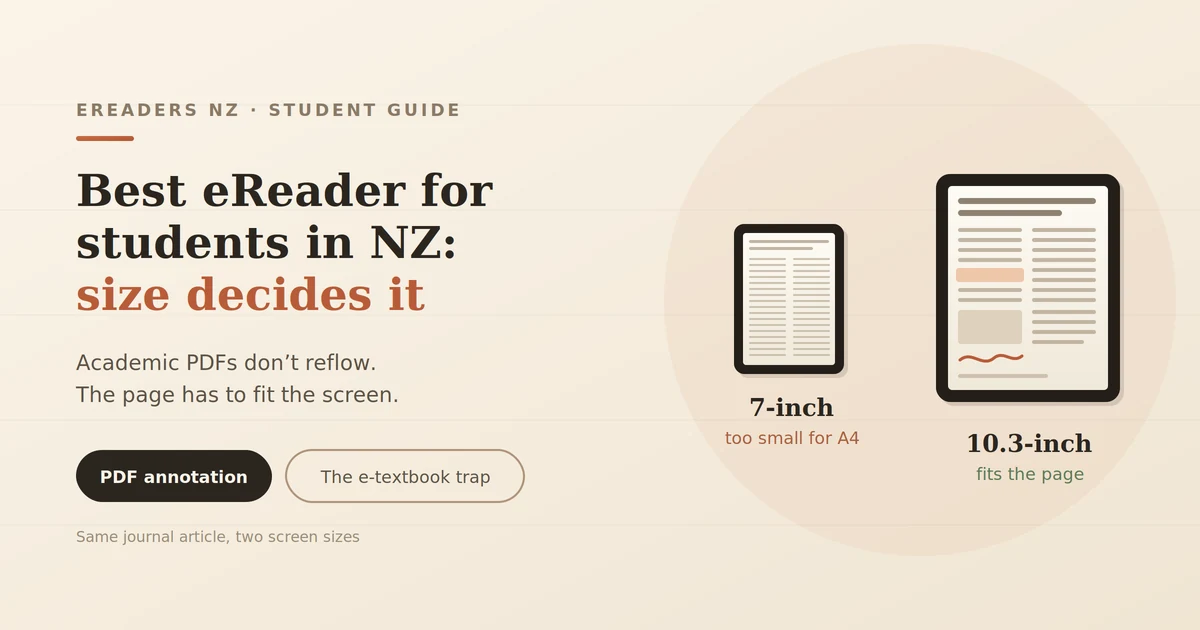
If your readings are PDFs journal articles, course packs, scanned chapters, lecture slides you need 10.3 inches or larger. Below that, academic PDFs aren’t comfortably readable.
If your readings are EPUB ebooks library borrows, general textbooks, novels for a literature paper a 7-inch reader does the job at roughly a third of the price.
Most NZ university students fall into the first group. Check before you buy, because the price difference between the two is substantial.
Screen size is decided by your readings, not your preference
This is the part that matters most, and it’s worth understanding properly.
Ebooks are reflowable. The text rearranges itself to fit whatever screen you’re on, so a novel reads fine on a 6-inch device. Academic PDFs are fixed-layout. The page is a fixed A4 canvas with the text, figures, tables and equations locked in position. Nothing rearranges. The page either fits on your screen or it doesn’t.
Why 6–7 inch readers fail on journal articles
Put an A4 two-column journal article on a 6-inch screen and you have three bad options:
- Shrink to fit the text becomes too small to read.
- Zoom and pan you are dragging around the page constantly, losing your place, and burning battery on refreshes.
- Reflow mode the device attempts to extract and reformat the text, which breaks on two-column layouts, mangles equations, strands figures away from the text referencing them, and scrambles tables.
Reflow works reasonably on a simple single-column PDF. On a typical academic paper it produces something you can technically read and won’t want to.
If your course involves engineering, sciences, statistics, law or anything with dense figures, this rules out small screens entirely.
When a small reader is genuinely enough
Don’t over-buy. A 7-inch device is the right call if:
- Your readings are mostly EPUB library books, set novels, trade textbooks
- You’re in a humanities subject reading prose rather than papers
- You already annotate on a laptop and just want comfortable reading
- You want something you can hold one-handed on the bus
For that use, spending $700 on a large device is money wasted.
The 13.3-inch case
Full A4 at genuine one-to-one scale, with room for margin notes. Genuinely better for dense material and heavy, expensive, and awkward in a lecture theatre.
Worth it if you’re doing a research-heavy postgraduate degree, or reading standards, case law, or large-format technical documents daily. For most undergraduates, 10.3 inches is the sensible ceiling.
Check your prescribed texts before you buy
Here’s the warning no retailer enjoys publishing, and the most useful thing in this article.
Many prescribed textbooks in New Zealand aren’t sold as files you own. They’re access codes to browser-based platforms VitalSource, RedShelf, Cengage, Pearson and similar. Those platforms use DRM and are designed around fast colour screens. Support on E Ink ranges from workable to genuinely unusable, depending on the platform, the Android app, and whether it requires constant connectivity.
Do this before you spend anything:
- Find your course outlines and list every prescribed text.
- For each one, identify how it’s delivered file download, library ebook, or platform access code.
- For platform texts, check whether an Android app exists and whether it works offline.
- If your core text is platform-locked and app support is poor, an e-reader won’t solve your main problem.
An e-reader is excellent for PDFs you can download and own. It’s much weaker for content locked behind a publisher’s web reader. Knowing which category your course falls into is worth more than any spec comparison.
Which size fits which study pattern
| 6–7 inch | 10.3 inch | 13.3 inch | iPad | |
|---|---|---|---|---|
| Typical price | $250–400 | $650–900 | $1,100+ | $600+ |
| Academic PDFs | Poor | Good | Excellent | Good |
| EPUB reading | Excellent | Good | Overkill | Good |
| Handwriting | No | Yes | Yes | Yes |
| Weight in a bag | Negligible | Noticeable | Heavy | Noticeable |
| Battery | Days to weeks | Days | Days | Hours |
| Eye comfort over hours | High | High | High | Moderate |
| Colour, video, lectures | No | No | No | Yes |
| Best for | Prose-heavy courses | Most students | Research-heavy postgrad | Everything except long reading |
Note-taking: where your notes actually end up
The pen feel matters less than the export path. Before buying, work out how notes get from the device to wherever you’ll write your assignment because that’s where they need to be.
Three things to check:
- PDF annotation can you highlight and add margin notes, and do they survive when the file moves to your laptop?
- Handwriting export does it export as PDF, image, or searchable text? Searchable is considerably more useful come exam revision.
- Cloud sync most New Zealand universities run Microsoft 365, so OneNote compatibility is worth checking specifically rather than assuming.
Handwriting recognition on E Ink has improved but isn’t flawless, particularly with mixed notation or messy writing under time pressure. Treat it as a bonus rather than the reason you buy.
One honest caveat: writing on E Ink feels good, but it’s slower than typing. For lecture capture, a laptop is still faster. These devices are better for reading-and-annotating than for transcribing at speed.
What matters for students in New Zealand specifically
Canvas and Moodle downloads. Most course material downloads as PDF, which works well. Get into the habit of downloading before class rather than relying on campus wi-fi in a full lecture theatre.
Library access. University library ebook collections and public library borrowing through Libby both work on Android-based readers. Between them you can cover a surprising amount of a reading list without buying anything worth exhausting before you buy texts.
Carrying it. A 10.3-inch device plus a laptop is a real weight on a day with three lectures and a bus each way. Some students end up leaving the reader at home, which is the most expensive outcome available.
If you’re wondering whether it’ll survive a full day of lectures without a charge, our guide to how long an e-reader battery actually lasts covers real runtime rather than the marketing figure.
eReader vs iPad vs laptop
An e-reader isn’t a replacement for either of your other devices. It’s a third device that does one job better than both.
Where the e-reader wins
- Hours of reading without eye fatigue no glare, no flicker
- Days of battery instead of hours
- Almost nothing on it to distract you
- Readable outdoors, which matters more than you’d think in a New Zealand summer
Where the iPad wins
- Colour figures, diagrams and anatomical images
- Lecture recordings and video content
- Fast interaction and a much shorter learning curve
- One device rather than two
Where the laptop wins
- Writing assignments this doesn’t change
The honest framing: buy an e-reader because you read for hours and it makes that better. Don’t buy one expecting it to replace a tablet. If you already own an iPad you’re happy with, the case is weaker you’d be buying comfort, not capability.
The reason it’s more comfortable comes down to how the screen works: it reflects light rather than emitting it, which is worth understanding before you spend. Our explainer on how E Ink technology works covers it.
What you get at each price
Under $400 a compact reading device. No handwriting, small screen, excellent battery. Right if your readings are EPUB.
$650–900 the practical student tier. 10.3-inch screen, stylus, Android apps, split-screen. This is where academic PDFs become genuinely workable.
$1,100+ large-format, full A4 at scale. For postgraduate research and document-heavy work.
A realistic note on budget: if you’re stretching to afford the middle tier, check first whether your faculty has laptop or device loan schemes, and whether your reading list can be covered through library ebooks. A device you bought instead of textbooks isn’t a saving if the textbooks were free through the library.
Who shouldn’t buy one
Be honest about these:
- All your readings are EPUB and you’re comfortable reading on your phone
- Your prescribed texts are on platforms with poor E Ink support
- Your course is lab, studio or practical based with little sustained reading
- You already own and like an iPad
- Your degree needs colour anatomy, design, art history, anything where figures carry the information
None of those make E Ink bad. They just mean it won’t solve your problem.
FAQs
Can you read PDFs on a Kindle?
You can load them, but small Kindles handle fixed-layout academic PDFs poorly. For course readings you want a larger screen and proper annotation tools.
What size eReader is best for university?
10.3 inches for most students. It fits an A4 page at readable scale with room to annotate, without the weight and cost of a 13.3-inch device.
Can I annotate PDFs on an eReader?
On stylus-equipped models, yes highlighting, margin notes and handwriting. Check how annotations export before buying, since that’s where students get caught out.
Is an eReader better than an iPad for studying?
For long reading sessions, it’s more comfortable and lasts far longer between charges. For colour figures, video and lecture recordings, an iPad is better. They’re different tools.
Can I get my university textbooks on an eReader?
Depends on delivery. Downloadable PDFs and library ebooks work well. Textbooks locked to publisher web platforms often don’t. Check each prescribed text before buying.
Do eReaders work with Canvas?
You can download course PDFs from Canvas and read them on the device. Browsing Canvas itself on E Ink is possible but slow download first.
How long does the battery last for a full day of lectures?
Comfortably, even with heavy PDF use. Expect days rather than hours, though PDFs and the frontlight drain faster than plain text.
Check compatibility before you spend
The most useful thing you can do before buying isn’t comparing spec sheets. It’s pulling up your course outlines and working out what format your readings actually come in, and which platforms your prescribed texts use.