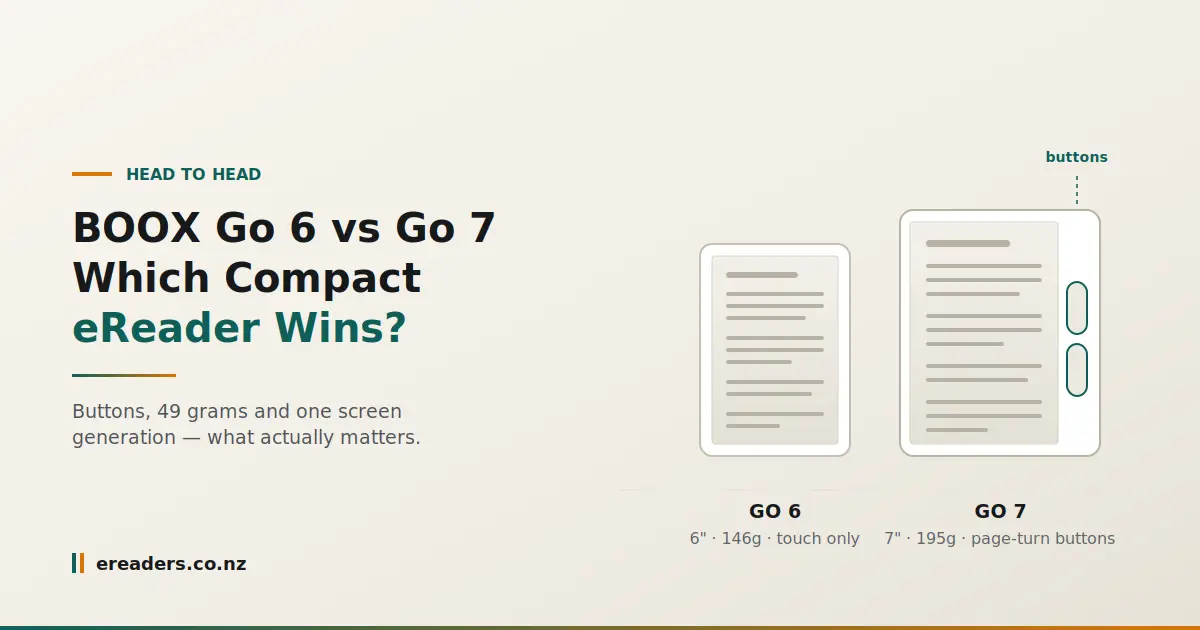
One inch of screen. Forty-nine grams. A price gap of roughly a hundred dollars. And two spec sheets that tell you everything except which device you’ll actually enjoy holding for an hour.
BOOX Go 6 vs Go 7
Choosing between the BOOX Go 6 and BOOX Go 7 is easier than the feature lists suggest, because only three differences genuinely change your reading. Here they are, along with the verdict up front: the Go 7 is the better device, and the Go 6 is still the right buy for a specific kind of reader. Which one you are is the whole question.
The short answer
Buy the Go 7 unless weight or price is your deciding factor. It has the newer screen, physical page-turn buttons, a much larger battery, newer software, a speaker and optional stylus support. The Go 6 exists for readers who want the smallest, lightest and cheapest option and don’t need anything else.
That’s an unusually one-sided verdict for a head-to-head, and it’s the honest one. The Go 7 isn’t a slightly refreshed Go 6 it’s a more capable device in almost every dimension.
Side-by-side specifications
| BOOX Go 6 | BOOX Go 7 | |
|---|---|---|
| Screen | 6″ E Ink, 300ppi | 7″ E Ink Carta 1300, 300ppi |
| Resolution | 300ppi | 1680 × 1264, 300ppi |
| Weight | ~146g | ~195g |
| Thickness | — | ~6.4mm |
| Battery | 1,500mAh | 2,300mAh |
| Page-turn buttons | No — touch only | Yes, on a wide grip bezel |
| Stylus support | No | Yes — optional InkSense stylus, sold separately |
| Speaker / Bluetooth | Yes | |
| Android version | Older release | Android 13 |
| RAM / storage | 4GB / 64GB | |
| microSD | Yes | Yes |
| Frontlight | Adjustable, warm and cold | Adjustable, warm and cold |
| Water resistance | No rating | Water-repellent design, no official IP rating |
| NZD price |
The three differences that actually change your reading
Of the dozen differences in that table, three decide how the device feels in your hands: the page-turn buttons, the 49-gram weight gap, and the screen generation. The rest matter at the margins.
Page-turn buttons and the asymmetric bezel
The Go 7 has a deliberately lopsided design thin bezels on three sides, a wide one on the fourth housing two physical page-turn buttons. The Go 6 is touch-only.
If you read in bed, one-handed, for long stretches, this is the difference. Buttons let you settle into one grip and stay there. Tapping means repositioning your thumb across the screen every page, and it means your fingers are on the glass you’re trying to read through.
Two honest notes. The asymmetric design looks odd at first reviewers have said as much and then reported it growing on them once the grip becomes habit. And the wide bezel means the power and USB-C ports sit in corners whose position depends on which hand you hold it in, which some people find mildly strange.
146g versus 195g
Forty-nine grams sounds trivial. Over an hour of holding a device above your face in bed, it isn’t.
This is the Go 6’s strongest argument and the reason it still has a place in the range. If you read lying down, if you want something that genuinely disappears into a jacket pocket, or if wrist strain is a real consideration for you, the lighter device wins regardless of what else the spec sheet says.
For context, the Go 7 is still light under 200g, less than many phones. But the Go 6 is lighter, and lighter is the one thing it does better than its bigger sibling.
Carta 1300 versus the older panel
The Go 7 uses a newer E Ink panel generation. Both are 300ppi, so text sharpness is comparable, but the newer panel is designed for deeper contrast.
Be realistic about the size of this difference. Side by side in good light you may notice slightly blacker blacks on the Go 7. Reading one device alone, most people wouldn’t be able to tell you which panel generation they were looking at. It’s a real improvement and a minor one don’t let it be the reason you spend more.
What the Go 7 does that the Go 6 simply can’t
Beyond the reading experience, the Go 7 adds three capabilities the Go 6 doesn’t have at all: stylus input, audio, and enough hardware headroom to run Android apps comfortably.
Stylus support
The Go 7 works with BOOX’s optional InkSense stylus a first for their 7-inch readers. You can annotate books, highlight, and jot notes in the Notes app.
Set expectations properly: this is margin-notes and shopping-list territory, not a substitute for a Note Air or Note Max. The stylus is sold separately and you should treat it as a bonus rather than a reason to buy.
Speaker, Bluetooth and audiobooks
The Go 7 has a built-in speaker and Bluetooth, which makes audiobooks and podcasts genuinely usable — and text-to-speech an option for anyone who wants it.
Either this matters to you a great deal or not at all. There’s no middle ground on audio.
Android version and performance
The Go 7 runs Android 13 with 4GB of RAM. That matters for two reasons: Play Store apps behave better with more memory, and a newer Android release means a longer useful life before apps start refusing to install.
This is the least glamorous difference and possibly the most consequential over three or four years of ownership.
The Go 7’s flaw you should know about before you buy
Multiple independent reviewers have reported uneven frontlight on the Go 7 a faint darker line running down one side of the screen once brightness passes a certain point. It’s attributed to the LEDs being arranged along a single edge, and at least one reviewer says BOOX told them it can’t be resolved.
We’d rather you heard that from us than noticed it in week one.
How much it matters in practice
It depends entirely on how you use the frontlight.
- If you read mostly in ambient light with the frontlight off or low, you’re unlikely to see it at all.
- If you read in the dark with the light up high, you may notice it, particularly on a plain page.
- If you’re sensitive to screen uniformity the sort of person who notices backlight bleed on a monitor assume you’ll see it and factor that in.
Some reviewers have also described a halo effect around the bezel edge, and battery life shorter than the 2,300mAh figure implies.
None of that stops the Go 7 being the better reader. It does mean you should buy it knowing what you’re getting.
Battery life: bigger cell, bigger screen
The Go 7’s 2,300mAh battery is substantially larger than the Go 6’s 1,500mAh, but it also drives a bigger screen, more RAM and a newer chipset. The real-world gain is smaller than the numbers suggest, and reviewers have criticised battery life on both models.
Expect days rather than the weeks that E Ink marketing tends to imply because these are Android tablets with Wi-Fi and apps, not locked-down e-readers.
What actually drains an E Ink reader
Page turns cost almost nothing. What drains the battery is:
- The frontlight, especially at high brightness
- Wi-Fi left on when you’re not syncing anything
- Background apps that keep checking for updates
- Anything animated — a scrolling web page costs far more than a book
Turn Wi-Fi off between syncs and keep the light low, and both devices last considerably longer than any review figure.
Which one suits you?
- Pocket and commute reading → Go 6. Smallest footprint, lightest, easiest to carry with you all day.
- Bedtime one-handed reading → genuinely split. Go 6 for the lighter weight, Go 7 for the buttons. If you can’t hold a device above your face for long, weight wins. Otherwise buttons do.
- Long sessions in a chair → Go 7. The grip bezel and buttons are more comfortable once you’re settled, and the extra inch of screen means fewer page turns.
- Audiobooks or text-to-speech → Go 7. The Go 6 can’t do this.
- Occasional annotation → Go 7 with the stylus. The Go 6 has no stylus option at all.
- Tightest budget → Go 6, without apology. It’s still a 300ppi E Ink reader with Play Store access.
- Keeping it four or five years → Go 7. The newer Android release is what determines how long your apps keep working.
Pros and cons
BOOX Go 6
For: lightest in the range at ~146g; smallest footprint; lowest price; 300ppi screen; Play Store access; microSD expansion.
Against: no page-turn buttons; no stylus support; smaller battery; older Android release; reviewers of the first-generation model reported sluggish performance and software bugs.
BOOX Go 7
For: newer Carta 1300 panel; physical page-turn buttons; larger battery; Android 13 with 4GB RAM; speaker and Bluetooth; optional stylus; textured grippy back; water-repellent design.
Against: 49g heavier; reported uneven frontlight with a faint line at higher brightness; bezel halo effect noted by some reviewers; battery life criticised despite the larger cell; costs more; no official IP rating despite the water-repellent claim.
Buying either one in New Zealand
Buying locally gets you an NZD price with GST included, domestic delivery rather than a customs wait, and cover under the Consumer Guarantees Act. On an overseas import, a fault at fourteen months means shipping a fragile E Ink panel offshore at your own cost.
That matters more than usual on the Go 7, given the frontlight reports if you receive a unit you’re unhappy with, you want a local supplier rather than an international returns process.
You can see current pricing and stock at eReaders NZ.
FAQs
Is the BOOX Go 7 worth the extra over the Go 6?
For most readers, yes the page-turn buttons, newer screen, larger battery and Android 13 are a meaningful upgrade. The exception is if weight or budget is your deciding factor, in which case the Go 6 remains a sensible buy.
Does the BOOX Go 6 have page-turn buttons?
No. The Go 6 is touch-only. Physical page-turn buttons are one of the Go 7’s headline features, housed in its wide side bezel.
Is the Go 7’s screen lighting really uneven?
Several independent reviewers have reported a faint darker line along one edge at higher frontlight brightness, attributed to single-sided LED placement. Whether you notice it depends on how bright you run the light.
Which is better for reading in bed one-handed?
Split decision. The Go 6 is 49g lighter, which matters when you’re holding it up. The Go 7’s grip bezel and buttons let you keep one steady hold. Try to handle both if you can.
Can either one take a stylus?
Only the Go 7, using BOOX’s optional InkSense stylus, which is sold separately. It suits annotation and quick notes rather than serious writing for that you want a Note-series device.
Which has better battery life?
The Go 7 has the larger cell, but also a bigger screen and more capable hardware, so the advantage is smaller than the mAh difference suggests. Both are more affected by frontlight and Wi-Fi use than by anything else.
Is the Go 6 fast enough for everyday reading?
For reading EPUBs, yes. Reviewers of the first-generation model criticised its performance with Android apps, so if you plan to run several reading apps and switch between them, the Go 7’s extra RAM and newer Android release will serve you better.