It’s 11pm, you’re two chapters into something good on your phone, and your eyes have started to feel gritty and slow that dull ache behind the brows that makes you put the book down before you wanted to. Plenty of people in that situation start wondering whether E Ink eReaders are better for your eyes, or whether that’s just something retailers say.
Are E Ink eReaders Better for Your Eyes?
The short version: yes, most people find E Ink noticeably more comfortable for long reading. But the reason is not the one you’ve probably been given, and there are claims about E Ink and eye health that don’t hold up. Here’s what’s actually going on.
The short answer: yes for comfort, but not for the reason you’ve been told
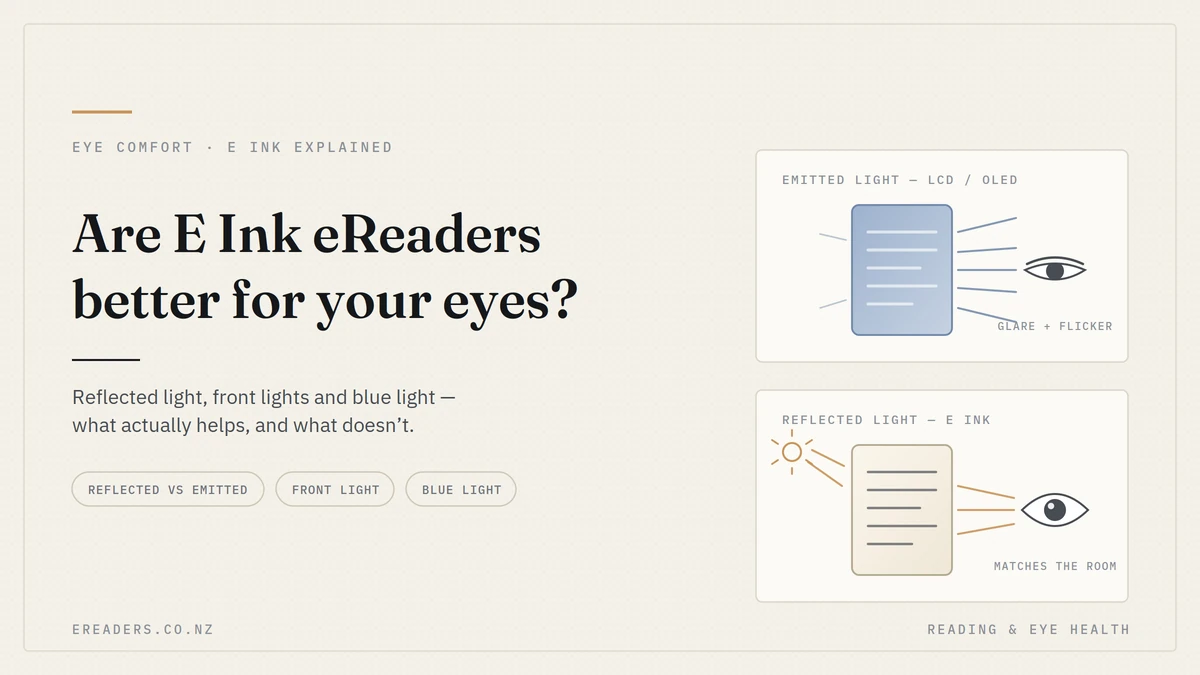
For sustained reading, E Ink is generally more comfortable than a phone or tablet screen. The main reason is optical, not chemical: an E Ink page reflects the light already in your room rather than shining light into your eye, so it behaves like paper. Blue light the thing most articles lead with is the weakest part of the argument.
That distinction changes what you should do about your sore eyes. Buy a device expecting blue light reduction to fix everything and you’ll be disappointed. Understand the real mechanisms and you can solve most of it with settings and habits, then choose hardware that supports them.
What actually causes eye strain when you read on a screen
Digital eye strain isn’t one thing. It’s a cluster of effects reduced blinking, tired focusing muscles, glare and contrast mismatch that stack up over a long session. Screen technology influences some strongly and others barely at all. Work out which ones are hitting you and the fix becomes obvious.
Reduced blink rate and dry eye
When you concentrate on text, you blink less often and less completely. The tear film thins, and you get that scratchy, burning, tired feeling that people usually describe as “eye strain” even though it’s really dryness.
New Zealand conditions don’t help. Dry southerly air, heat pumps running all winter, and a lot of us reading in bed with a fan or air con going all pull moisture off the eye surface. This is the single most common cause of evening reading discomfort, and no display technology fixes it on its own.
Accommodative and vergence fatigue
Holding focus at one close distance for an hour is muscular work. The ciliary muscle that adjusts your lens and the muscles that converge both eyes on the same point don’t get a break, and they fatigue like any other muscle.
Phones make this worse because small text pulls the device closer to your face. A 7-inch or 10-inch eReader with generous type sits further away and asks less of those muscles which is a size effect, not an E Ink effect.
Glare, reflections and contrast mismatch
A bright panel in a dark room is a hard task for your pupil. It’s trying to open up for the dim surroundings and close down for the glowing rectangle at the same time. Outdoors, the opposite happens: sunlight overwhelms the screen and you squint.
Reflective displays sidestep both. Because an E Ink page is lit by the same light as everything else around it, the page and the room stay in the same brightness range.
Where blue light genuinely fits in
Blue light has two separate claims attached to it, and they deserve very different levels of confidence. The evidence that ordinary screen blue light causes eye strain or eye damage is weak reviews of blue-light-filtering lenses have generally found little effect on visual fatigue. The evidence that evening light exposure shifts your body clock and delays sleep is much stronger.
So blue light is worth managing before bed, mainly for sleep. It’s a poor explanation for why your eyes hurt at 9pm.
How E Ink displays work and why that matters for your eyes
An E Ink screen holds millions of microcapsules containing charged black and white pigment particles. A brief electric field moves those particles to the surface or away from it, and then the image stays put with no power and no refreshing. Nothing on the page is emitting light at you.
That last point is the whole ballgame for eye comfort.
Reflected light instead of emitted light
Reading an E Ink page in daylight is optically the same as reading a paperback: light lands on the surface, bounces off the pigment, reaches your eye. Brightness scales with the room automatically, so take it outside and it gets easier to read, not harder which is why E Ink is the only screen type that works on a Kiwi beach in January.
Front light vs. backlight the difference people miss
This is the distinction that clears up most of the confusion. A tablet is backlit: LEDs sit behind the panel and fire light through it, straight toward your pupil. An E Ink device with adjustable lighting is front-lit: small LEDs sit in the bezel and throw light across the surface of the page, which then reflects off it in the normal way.
Two practical consequences:
- A front-lit E Ink device does emit some light, including some blue wavelengths, so “zero blue light” is not accurate for a device with the light on.
- Most models let you mix warm and cool light and run the total level very low, because you’re only topping up the reflected light rather than generating the whole image.
Turn the front light off in a well-lit room and you’re back to pure reflection.
No PWM flicker or pixel refresh
Many LED and OLED screens dim by switching the backlight on and off very rapidly. Most people never consciously see it; a minority are sensitive and report headaches. A static E Ink page has no refresh cycle at all — the particles simply sit where they were placed. If you’re one of the people who reacts badly to certain phone screens, this is a real difference rather than a marketing line.
E Ink vs LCD/OLED for eye comfort: a straight comparison
Judged purely on reading comfort, E Ink wins on light source, glare, flicker and dark-room contrast. LCD and OLED win decisively on speed, colour and video. Neither is universally “better” they are built for different jobs.
| Factor | E Ink (ePaper) | LCD / OLED tablet or phone |
|---|---|---|
| Light source | Reflects ambient light; optional edge front light | Emits light through the panel toward your eye |
| Bright sunlight | Improves — more light means more contrast | Washes out; you squint or crank brightness |
| Dark room | Very low front-light levels suffice; small brightness gap with surroundings | Even minimum brightness often exceeds the room |
| Flicker | None on a static page | PWM dimming on many models |
| Blue light | Low; not zero with front light on, especially in cool mode | Higher, though night modes reduce it |
| Refresh speed | Slow; occasional ghosting between pages | Fast and smooth |
| Colour | Limited on colour E Ink; muted next to LCD | Excellent |
| Text sharpness | High for static text at 300ppi-class panels | High, but paired with emitted light |
| Reading distance encouraged | Further, with large type on 7–10″ panels | Closer, especially on phones |
| Best suited to | Books, PDFs, study, long sessions, outdoors | Video, browsing, graphics, quick reference |
What the research does and doesn’t support
Be careful here, because this is where most content on the topic oversells. The honest position: comfort benefits during long reading sessions are reasonably well supported and widely reported by users, sleep-related benefits from reducing evening light are supported, and claims about preventing eye damage or short-sightedness are not.
It’s worth knowing that laboratory comparisons of e-paper and LCD reading have produced mixed results some studies find measurable differences in visual fatigue, others find little difference under controlled lighting when text size and brightness are matched. That doesn’t mean the comfort you feel is imaginary. It means much of the real-world benefit comes from the reading conditions E Ink encourages lower light output, bigger type, greater distance, no notifications rather than from the pigment itself.
Claims to be sceptical of
If you see these, treat the rest of the source carefully:
- “E Ink is completely blue-light free.” Not true with a front light on.
- “E Ink prevents or cures eye damage.” No display protects the eye from disease.
- “Switching to E Ink will stop your child becoming short-sighted.” Myopia development is linked to genetics, total near-work time and time spent outdoors — not to which screen type the near work happens on.
- “E Ink eliminates eye strain.” It reduces some contributors. Dry eye and focusing fatigue still need blinking, breaks and distance.
- “Doctor recommended” with no named clinician or study attached.
Who benefits most and who won’t notice much
The people who feel the biggest difference are those reading for 30 minutes or more at a stretch, reading in bed, reading outdoors, or already dealing with dry, tired eyes. If you read in ten-minute bursts on a bus, the change will be modest.
Long-session readers, dry-eye sufferers and night readers
This is where the gap is widest. An hour of novel-reading with the front light at 10% and warm tone is a different experience from an hour at phone brightness. Night readers also get the sleep-timing benefit alongside the comfort one.
Students and PDF-heavy workers
If you’re working through textbooks, journal articles or annotated PDFs, screen size matters more than display technology. A 10.3-inch panel shows an A4 page at close to native size, so you’re not pinch-zooming or reading 8-point text at 25cm. That reduction in focusing demand does more for your eyes than any coating or filter.
When E Ink won’t help
Be clear-eyed about the limits. An eReader will not compensate for an out-of-date prescription, uncorrected astigmatism, presbyopia you’ve been ignoring, or clinically significant dry eye. It also won’t undo eight hours a day on a work monitor. Persistent eye pain, headaches, blurred vision or double vision are reasons to see an optometrist or GP, not reasons to buy a device.
Pros and cons of reading on E Ink for eye comfort
Pros
- Reflected light means no panel shining into your pupil
- Works better as ambient light increases, including outdoors
- No flicker on a static page
- Front light can run far lower than a tablet’s minimum brightness
- Warm light modes help with evening reading and sleep timing
- Encourages larger type and a longer reading distance
- No notifications interrupting the session
Cons
- Slower page turns; occasional ghosting on some refreshes
- Colour is muted compared with LCD, even on colour E Ink models
- Poor fit for video, gaming and fast scrolling
- A front light set too bright in a dark room still causes discomfort
- Won’t address an underlying vision problem or medical dry eye
- Glossy screen protectors can reintroduce reflections
How to set up an eReader so it’s actually kind to your eyes
Most of the benefit comes from how you configure the device, not from owning it. Match the light to the room, make the text bigger than feels necessary, and take breaks.
- Turn the front light off whenever the room is bright enough. Reflection alone is the most comfortable mode.
- In dim rooms, start at the lowest usable level — often 5–15% — and add warmth rather than brightness.
- Use warm light in the last hour before bed. Cool white at night works against your sleep timing.
- Increase font size and line spacing until you can read at arm’s length without leaning in.
- Hold the device 35–45cm away, roughly a forearm’s length, and keep it slightly below eye level.
- Follow the 20-20-20 habit: every 20 minutes, look at something about 6 metres away for 20 seconds.
- Blink deliberately at the end of each chapter, with full closures. Consider preservative-free artificial tears if you’re prone to dryness.
- Set PDFs to a warm or off-white background rather than pure white, and choose a matte screen protector over a glossy one.
If you’re weighing up screen sizes or front-light options, it’s worth comparing a few models side by side before deciding the range of E Ink eReaders and ePaper tablets at eReaders NZ covers everything from 6-inch pocket readers to 10.3-inch panels suited to A4 documents.
FAQs
Are E Ink eReaders actually better for your eyes than a tablet?
For long reading sessions, most people find them more comfortable. The main reasons are reflected rather than emitted light, no flicker on a static page, and much lower light output. They don’t eliminate eye strain, and they won’t fix an underlying vision problem.
Does E Ink emit blue light?
With the front light off, effectively none the page only reflects room light. With the front light on, yes, some, including blue wavelengths. Warm light modes and low brightness settings reduce it considerably.
Can an eReader cause eye strain?
It can. Reading small text for hours without breaks, or running the front light bright in a dark room, will still tire your eyes. The device reduces some contributors to strain; blinking, breaks and sensible type size handle the rest.
Is E Ink better than paper for your eyes?
With the front light off, it’s optically very similar to paper. Adjustable text size is a genuine advantage over print for anyone with ageing eyes or low vision. Paper’s advantage is that it never tempts you to add light you don’t need.
Will an eReader stop my child becoming short-sighted?
No, and be wary of anyone claiming otherwise. Myopia development is associated with genetics, total near-work time and time spent outdoors. Reducing overall near-work hours and getting outside daily matter far more than which screen the reading happens on. Discuss any concerns with an optometrist.
Should I use the front light or read in a lit room?
Room light first, front light only to top it up. A well-lit room with the front light off is the most comfortable setup for most readers; at night, the lowest warm setting that keeps text legible is better than a bright cool one.
Is a bigger E Ink screen easier on the eyes?
Often, yes, mainly because larger panels let you use bigger text at a greater reading distance, which reduces focusing effort. For PDFs and textbooks the difference between a 7-inch and a 10.3-inch screen is significant.
Still not sure which one suits your eyes?
Screen size, front-light quality and reading distance matter more than the spec sheet suggests, and they’re hard to judge online. Compare a few models on those terms, or talk to the New Zealand–based team at eReaders NZ about how you actually read in bed, outdoors, or working through A4 documents and we’ll point you toward the sizes that suit rather than the most expensive one. If your eye discomfort is persistent or painful, see an optometrist first; a device is not a substitute for an eye exam.