Three years in, and you’re charging it twice a week. It used to go a fortnight.
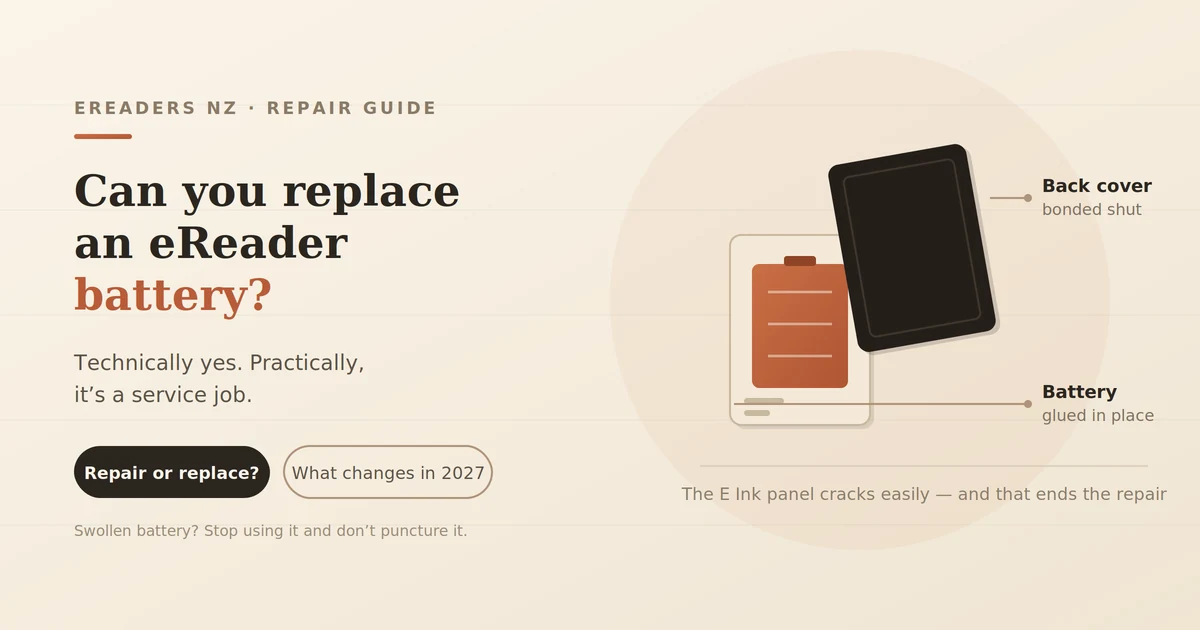
So: can you replace an eReader battery? Technically yes, practically, it’s a service job rather than a user one. The cell is glued inside a bezel that’s also glued, and getting to it takes heat, patience and a willingness to risk the screen. Almost no e-reader sold today is designed for you to open it.
That’s changing from February 2027, which I’ll come back to. First, a question worth asking before you spend anything.
Can you replace an eReader battery?
Yes, but understand what’s involved:
- The battery is adhered inside the case, not clipped in
- The bezel is bonded with adhesive, so opening requires heat
- The E Ink panel is a thin laminated stack that cracks under uneven pressure and a cracked panel is not repairable
- Very few models offer user replacement, though some larger devices are more serviceable than others
It’s done routinely by repair shops. It’s also where a lot of enthusiastic first attempts end with a destroyed device.
First is the battery actually the problem?
This section will save some readers the whole exercise. Most reported battery problems aren’t battery problems.
The usual culprits:
- Frontlight brightness the single biggest controllable drain
- Wi-Fi hunting for a network it can’t reach
- Background apps, on Android-based devices
- A short full-refresh interval with image-heavy content
The one-hour test
Before concluding anything, do this:
- Charge to 100%
- Turn Wi-Fi off
- Set the frontlight to zero
- Read plain text for one hour
- Note the percentage drop
A healthy device loses a small single-digit percentage. If it holds up well under those conditions but empties in a day of normal use, your settings are the problem, not the cell. Our guide to how long an e-reader battery actually lasts covers what to change.
Normal ageing versus a fault
Normal: gradual decline across years. This year’s charge lasts a bit less than last year’s.
Not normal:
- Sudden collapse 60% to 5% in minutes
- 20%+ overnight loss with Wi-Fi off
- Won’t charge past a certain percentage
- Physical swelling a case that no longer closes flat, or a bulging back
That last one is a stop sign, covered below.
What’s actually involved
Not a tutorial a description, so you can judge whether to attempt it.
A replacement means softening the adhesive holding the bezel or back panel, usually with controlled heat, then separating it without flexing the panel. Inside, a ribbon cable connects the battery to the board, and the cell itself is stuck down with more adhesive. The new cell goes in, new adhesive seals it, and everything is reassembled.
The risk that matters: the E Ink panel is a laminated stack of thin layers. Uneven prying, a slipped tool, or too much pressure in the wrong spot cracks it. A cracked E Ink panel can’t be repaired the whole display assembly is replaced, which usually costs more than the device is worth.
That’s the asymmetry. A successful repair saves you the price of a device. A failed one costs you the device.
Should you do it yourself?
Arguments for
- Considerably cheaper than professional service
- Replacement cells are available for common models
- On a device you were about to retire anyway, there’s little to lose
Arguments against
- The panel risk is real and permanent
- Needs heat control, prying tools and patience
- Voids any remaining warranty
- Lithium cells are a genuine hazard if punctured
- A reassembled device may never sit perfectly flat again
The honest advice: if the device is otherwise dead to you and you’d enjoy the attempt, go ahead. If it’s a device you rely on, pay someone.
If the battery is swollen, stop. Don’t press it, don’t puncture it, don’t attempt removal. A swollen lithium cell is damaged and can vent or ignite if pierced. Stop charging it, stop using the device, store it somewhere away from anything flammable, and have it handled professionally or disposed of through a battery recycling point.
Repair, replace, or live with it
The decision is usually economic rather than technical.
| Device value | Likely repair cost | Verdict |
|---|---|---|
| Budget reader (under ~$250) | Often close to device price | Replace repair rarely stacks up |
| Mid-range (~$300–500) | Meaningful fraction of value | Depends on device age and how you use it |
| Large note-taking device ($650+) | Small fraction of value | Repair is usually clearly worth it |
| Any device under warranty | Possibly nothing | Talk to the retailer first |
The pattern: the more you paid, the more repair makes sense. On a 10.3-inch device, a battery service is a fraction of replacement cost and keeps a perfectly good screen in use. On a cheap reader four years old, you’re spending most of a new device’s price to refresh one component of an old one.
Your rights under the Consumer Guarantees Act
Worth knowing, because most articles on this topic are written for markets without it.
Under the Consumer Guarantees Act 1993, goods sold in New Zealand must be of acceptable quality and reasonably durable judged against the type of product, the price paid, and what a reasonable consumer would expect. That obligation sits with the retailer who sold it to you.
How that applies here:
- Gradual decline over four or five years is normal ageing, not a fault. The CGA doesn’t cover wear.
- A battery failing at eighteen months on a premium device is a different conversation, and worth raising.
- Swelling or sudden failure well inside a reasonable lifespan is worth raising regardless of warranty period.
Practical steps: contact the retailer you bought from rather than the manufacturer, have your proof of purchase, and describe the fault in terms of what it does rather than what you think caused it.
This is general information, not legal advice. Consumer Protection publishes plain-English guidance on what acceptable quality means, and the Disputes Tribunal exists for cases that don’t resolve.
What’s changing in 2027
Here’s the part that might change your decision about timing.
Regulation (EU) 2023/1542 takes effect on 18 February 2027. It requires portable batteries in devices to be removable and replaceable by the end user and the wording matters. A battery counts as readily removable only if it can be taken out with commercially available tools, without specialised or proprietary tools, thermal energy, or solvents.
Heat and adhesive solvents are exactly how e-reader batteries are replaced today. That method is what the regulation rules out.
Smartphones and tablets have an exemption route through a separate Ecodesign regulation if they meet durability and water-resistance criteria. E-readers aren’t smartphones or tablets, so they appear to fall under the general requirement and iFixit has reported that Amazon looks to be preparing user-replaceable batteries for the Kindle, alongside Nintendo doing the same for the Switch 2 in the EU.
Separately, the EU Right to Repair Directive (2024/1799) took effect on 31 July 2026, requiring manufacturers to offer repairs, spare parts and repair manuals, and barring them from using software to block repair.
Does this help New Zealand buyers?
Not directly these are EU laws, and New Zealand isn’t covered.
But manufacturers generally dislike building region-specific hardware. When the EU mandated USB-C, the connector changed globally rather than only in Europe. The same logic may apply here: if a Kindle has to be designed for user battery replacement to be sold in the EU, building a second sealed version for everywhere else is an expense with little upside.
What it means practically: if your current device is limping and you were planning to replace it anyway, devices bought after early 2027 may be significantly easier to service. That’s not a reason to suffer for eighteen months but it’s worth knowing if you’re deciding between a repair now and a replacement soon.
Making the battery you have last longer
Whatever you decide, these help:
- Keep it out of heat. Hot cars, windowsills and direct sun age cells faster than charging does.
- Partial charges are fine. There’s no benefit to running it flat.
- Don’t store it flat. Charge to around 50% before a long break.
- Don’t leave it plugged in for days at a stretch.
- Drop the frontlight. It won’t extend cell life, but it’ll extend every charge.
Getting it done in New Zealand
Realistically, there isn’t much specialist e-reader repair infrastructure here. Your options:
- The retailer you bought from, especially if the device may still be covered
- General electronics or phone repair shops, some of which will take on an e-reader
- Manufacturer service, which may mean shipping offshore and waiting
Questions worth asking before committing:
- Have you worked on E Ink devices before?
- What happens if the panel is damaged during the repair?
- Is the replacement cell new, and what’s the warranty on the work?
- What’s the total cost including return shipping?
If the answers are vague and the device is cheap, replacement is usually the saner path.
FAQs
How long do eReader batteries last?
Typically four to six years of normal use before capacity loss becomes annoying. Lithium cells are commonly rated around 300–500 full cycles to roughly 80% capacity, and most readers charge far less often than daily.
Can I replace a Kindle battery myself?
It’s possible but not designed for it the case is adhesive-bonded and the panel is fragile. From February 2027, EU rules should make new devices considerably easier to open.
How much does an eReader battery replacement cost?
It varies by model and repairer. The useful comparison isn’t the dollar figure but what fraction of a replacement device it represents.
Is it worth repairing or should I just buy a new one?
On a large note-taking device, repair usually makes sense. On a budget reader several years old, replacement normally does.
What if my battery is swollen?
Stop using and charging it immediately. Don’t press or puncture it. Have it handled professionally or taken to a battery recycling point.
Will replacing the battery void my warranty?
A self-repair generally will. If the device may still be covered, talk to the retailer before opening anything.
Should I wait for the 2027 rule change?
Only if you’re close to replacing anyway. It’s EU law, so New Zealand availability depends on whether manufacturers standardise globally which they often do, but it isn’t guaranteed.
Not sure which situation you’re in?
Run the one-hour test first. A good number of “dying battery” devices turn out to have a frontlight at 80% and Wi-Fi searching for a network that isn’t there.
If it really is the cell, tell us the model and roughly what you paid, and we’ll give you a straight answer on whether repair makes sense including when it doesn’t, and when it’s worth going back to the retailer instead. You can see the current range if replacement turns out to be the answer.