Take your phone to the beach in January and try to read a chapter. You’ll spend most of it angling the screen away from the sun and looking at your own reflection. Take an E Ink reader to the same spot and the page just sits there, perfectly legible, getting easier to read the brighter it gets.
E Ink vs LCD vs OLED
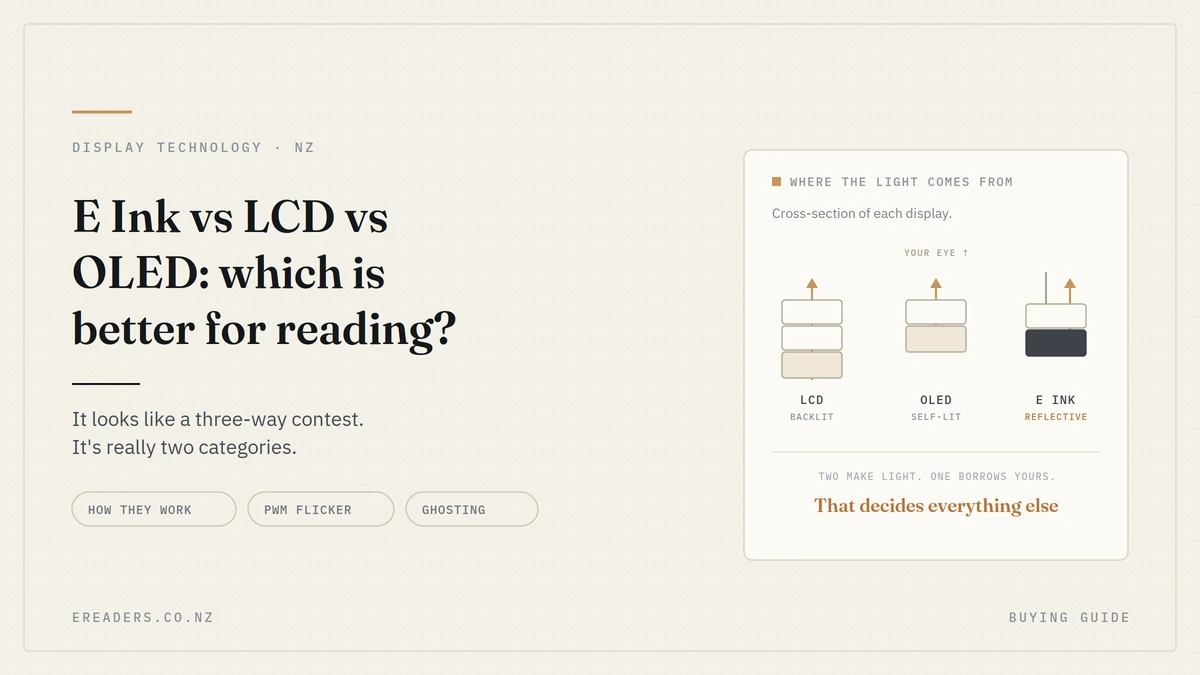
That difference isn’t a specification. It’s the entire point. Comparing E Ink vs LCD vs OLED for reading looks like a three-way contest, but it’s really two categories screens that make their own light, and one that borrows yours.
The short answer
For sustained text reading, E Ink. For everything else video, colour, speed, apps OLED. LCD sits between them on cost rather than capability.
The reason is structural rather than a matter of tuning: E Ink reflects ambient light like paper, while LCD and OLED both emit light at your eye.
It’s really two categories, not three
LCD and OLED are both emissive. They generate light and send it toward you. They differ in how they make that light, which matters for contrast and thinness, but not for the fundamental reading experience.
E Ink is reflective. It changes the colour of a surface and lets whatever light is in the room do the rest exactly like ink on paper.
Why that distinction matters more than the specs
Almost everything downstream follows from it. Sunlight readability, battery life, how the screen behaves in a dark room, why colour is limited, why video doesn’t work. Those aren’t independent features that manufacturers chose they’re consequences of one design decision.
Get that straight and the rest of this article is mostly detail.
How each display actually works
Worth understanding the mechanism, because it explains every trade-off that follows.
LCD: a backlight and a shutter
An LCD has a constant backlight behind a layer of liquid crystals. Apply voltage and the crystals twist, either blocking that light or letting it through, with colour filters producing red, green and blue.
Two consequences: black pixels aren’t really off they’re a shutter trying to block a light that’s still on, which is why blacks look dark grey and why you sometimes see backlight bleed at the edges. And the backlight runs continuously whether the screen shows a white page or a black one.
OLED: every pixel makes its own light
In an OLED panel, each pixel contains organic compounds that emit light directly when current passes through them. No backlight at all.
That means a black pixel is genuinely switched off. You get true blacks, very high contrast, and panels that can be thinner and more flexible. It’s why an OLED phone looks better than an LCD one in a dark room there’s nothing behind the image leaking light.
E Ink: pigment particles in microcapsules
An E Ink layer contains millions of tiny transparent capsules, each holding charged black and white pigment particles suspended in fluid. Apply an electric field and the particles move white to the top and it looks white, black to the top and it looks black.
Then the field switches off and the particles stay where they are. That property is called bistability, and it’s why an E Ink page costs no power to keep displaying. The screen only draws current when the image changes.
The comparison that matters for reading
| E Ink | LCD | OLED | |
|---|---|---|---|
| Light source | Reflects ambient light | Backlight through panel | Each pixel emits |
| In direct sunlight | Improves — more light, more contrast | Washes out badly | Washes out, though bright panels help |
| In a dark room | Front light, very low levels usable | Backlight bleed, greyish blacks | Best — true blacks, precise dimming |
| Refresh speed | Slow; ghosting between pages | Fast | Fast |
| Colour | Limited and muted on colour models | Good | Excellent |
| Video | Not usable | Yes | Yes |
| Battery while reading | Minimal — power only on page change | Continuous drain | Continuous, lower on dark content |
| Flicker | None on a static page | Possible with PWM dimming | Common with PWM at low brightness |
| Best for | Long-form text, outdoors | General use, budget devices | Video, colour, everything but sustained reading |
Sunlight: the clearest difference
Reflective displays get easier to read as ambient light increases. Emissive displays have to out-shine the sun, and they can’t.
This is the one comparison where there’s no argument. On a deck in January, on a beach, in a window seat on a flight, an E Ink screen behaves like a paperback more light simply means more contrast. A phone at maximum brightness is fighting a losing battle and draining its battery fastest precisely when it’s least readable.
If you read outdoors at all in a New Zealand summer, this single difference probably decides the question for you.
Reading in the dark: where OLED is genuinely better
Here’s the part a retailer is tempted to skip. In a dark room, OLED beats both LCD and front-lit E Ink for pure image quality.
Why OLED wins here
Black pixels are off. Nothing glows behind the text, there’s no bleed at the edges, and the panel can dim with precision. A well-implemented OLED at low brightness in a dark room looks superb.
The PWM caveat
Many OLED panels dim by switching pixels on and off very rapidly rather than reducing their brightness continuously pulse width modulation. Most people never consciously see it. A minority are sensitive and report headaches, eye discomfort or fatigue, particularly at low brightness where the off periods are longest.
If you’ve ever found a particular phone uncomfortable to read on at night without knowing why, this is a plausible reason.
How E Ink handles darkness
E Ink needs a light source because it has none of its own. Front-lit models place LEDs in the bezel that throw light across the surface, which then reflects off the page as usual rather than through the panel at your pupil. Warm-light modes shift the tone for evening reading.
Different approach, different trade-off. Our guide to E Ink and eye comfort covers that side properly rather than repeating it here.
Refresh, ghosting, and what E Ink can’t do
Being straightforward about the losses, because a comparison that won’t name them isn’t a comparison.
E Ink refreshes slowly, shows ghosting between pages, and cannot display video usefully. None of that is a defect — it’s the cost of moving physical particles instead of switching light on and off.
What ghosting actually is
When a page changes, some particles don’t fully complete their move, leaving a faint remnant of the previous image. Devices periodically do a full refresh that black flash you see every so often to clear it.
Most modern devices let you choose refresh modes, trading sharpness for speed. A sharp mode for reading, a faster one for browsing.
Why video doesn’t work
Video needs 24 to 60 new images every second. Pigment particles suspended in fluid can’t physically move that fast. This isn’t a software limitation anyone can optimise away.
Where that matters, and where it doesn’t
- Reading a novel: irrelevant. You turn a page every minute or two.
- Browsing and apps: noticeable. Scrolling feels sluggish compared with a phone.
- Comics and manga: noticeable, since you’re moving through images faster.
- Note-taking with a stylus: modern devices handle this well, but there’s still latency a tablet doesn’t have.
Colour: the honest state of play
Colour E Ink exists and is genuinely useful for some content. It’s also dimmer and less saturated than any LCD or OLED screen, and that’s unlikely to change soon.
How colour E Ink works
A colour filter array sits over the monochrome layer. Light passes through the filter, reflects off the pigment, then passes back through the filter again losing brightness at every stage. You also lose effective resolution, because multiple sub-pixels combine to produce one coloured dot.
When it’s worth it
Manga, comics, illustrated textbooks, colour-coded annotation, magazines. Content where colour carries meaning rather than decoration.
When it isn’t
Prose. A novel gains nothing from a colour screen, and you’d be accepting a dimmer display, more front-light use and shorter battery life for nicer book covers.
Battery: why the difference is enormous
E Ink draws power only when the image changes. A static page the state your reader is in for most of any reading session costs nothing. Emissive displays consume power continuously, and on a phone or tablet the screen is usually the single largest drain.
That’s why eReader battery life is quoted in weeks and tablet battery life in hours. The caveat: front light and Wi-Fi both change the figure substantially. An E Ink device with the light up and Wi-Fi on is a normal battery-powered device.
So which should you actually buy?
Match the display to how and where you read, rather than to which technology sounds most advanced.
Choose E Ink if
- You read for long stretches rather than short bursts
- You read outdoors, at the beach, or on a deck
- You read in bed and want minimal light output
- You want a device that isn’t also delivering notifications
- Multi-week battery life genuinely appeals
Choose OLED if
- You read in short bursts on a device you already own
- You want colour, video and fast apps on the same screen
- You read mostly indoors, in the evening
- You’d rather carry one device than two
LCD is the default rather than a choice
It’s what’s in most tablets and budget phones. Perfectly usable for reading, best at nothing in particular. If you’re reading on an LCD tablet and it’s working for you, there’s no crisis the question is whether you’d read more with something better suited to it.
[PLACEHOLDER: firsthand comparison — reading the same book on an E Ink device and a phone across a week, and what actually changed. Reading time, where you read, whether you finished it. Concrete beats theory here, and no competing page has it.]
FAQs
Is E Ink better for your eyes than LCD or OLED?
Most people find E Ink more comfortable for long reading, mainly because it reflects light rather than emitting it and has no flicker on a static page. It doesn’t prevent eye strain entirely blinking, breaks and text size still matter.
Why can’t E Ink display video?
Video needs dozens of new images per second, and E Ink works by physically moving pigment particles suspended in fluid. They can’t move that quickly. It’s a physical limit rather than a software one.
Is OLED bad for reading at night?
Not inherently OLED produces the best image quality in a dark room thanks to true blacks. The caveat is PWM dimming, which some people find uncomfortable at low brightness. If night reading on your phone gives you headaches, that’s worth investigating.
Does colour E Ink look as good as a tablet screen?
No. A colour filter over a reflective layer costs brightness, saturation and effective resolution. Colour E Ink is genuinely useful for manga, comics and illustrated material, but it won’t match an OLED for vividness.
Can you read on an E Ink screen in direct sunlight?
Yes, and it’s where the technology is strongest. More ambient light means more contrast, so an E Ink page becomes easier to read as conditions get brighter the opposite of what happens with a phone.
Why does E Ink battery last so much longer?
Because the display only draws power when the image changes. A page sitting on screen costs nothing to maintain, whereas an LCD or OLED consumes power continuously to keep showing anything at all.
Is a tablet good enough for reading, or do I need an eReader?
Plenty of people read happily on tablets. An eReader wins on sustained comfort, outdoor readability, battery and the absence of notifications. If you read in short bursts indoors on a device you already own, a tablet is fine.
Which one suits how you read?
There’s no universally better display there’s the one that suits where and how you read. If you read in ten-minute bursts on the couch, your phone is doing an adequate job and we’d say so.
If you read for an hour at a time, or outdoors, or in bed, the difference is substantial enough to be worth the second device.