You want one device. Lecture PDFs and work documents during the day, meeting notes with a pen, then a novel in bed at night without a backlit screen keeping you awake.
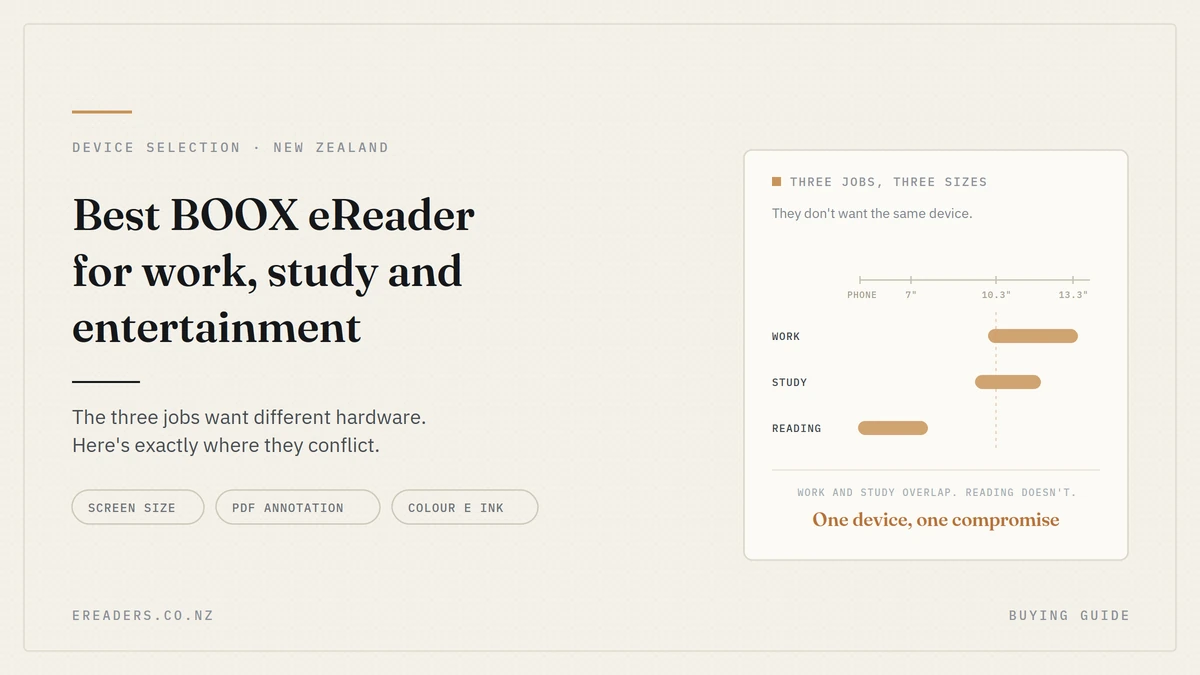
The problem is that those three jobs want different hardware. Work and study want a big screen; entertainment wants something you can hold in one hand. Finding the best BOOX eReader for work, study and entertainment isn’t about ranking models it’s about deciding which of the three you’re willing to compromise on. Here’s how that decision actually breaks down.
Best BOOX eReader for Work Study and Entertainment
The short answer
A 10.3-inch device handles work and study properly and does entertainment adequately. A 6–7-inch or phone-sized device is far better for entertainment but frustrating for A4 documents. If you need one device for all three, buy the 10.3-inch and accept that you’ll find it heavy in bed.
If you can stretch to two devices, that combination is genuinely better. More on that later.
The three jobs want different things
Each use case makes different demands, and they don’t line up neatly. Seeing them side by side is the fastest way to work out where you sit.
| Job | What it demands | Ideal screen | Colour needed? | Key feature | What it sacrifices |
|---|---|---|---|---|---|
| Work | A4 at native size, typing, export | 10.3″–13.3″ | Rarely | Keyboard cover, cloud sync | Portability |
| Study | Journal PDFs, note organisation, all-day battery | 10.3″ | Sometimes | Split screen, folder structure | One-handed comfort |
| Entertainment | One-handed, light, pocketable | Phone-sized to 7″ | For manga and comics | Weight, battery life | Document readability |
Work wants A4 and a keyboard
Business documents, contracts and reports are laid out for A4. Reading them at native size without pinching is what makes a device usable for work rather than merely possible. Add a keyboard cover and you have a genuine drafting machine.
Study wants portability and organisation
Journal articles are fixed-layout PDFs. Textbooks are dense. You’re carrying it across campus all day, and you need to find last month’s notes in the middle of a lecture. Screen size matters, but so does what you’re prepared to carry.
Entertainment wants small, light and one-handed
Novels in bed, on the bus, at the beach. Nothing about that wants a 10-inch slab. Manga and comics are the exception they want colour and faster refresh, which pulls the requirements in yet another direction.
Where those demands conflict
This is the part most buying guides skip, and it’s where the actual decision lives.
Screen size versus portability
The central conflict. A 10.3-inch screen shows an A4 page at close to native size, which transforms PDF reading. It also weighs enough that you’ll rest it on something rather than hold it, and it won’t go in a jacket pocket.
A 7-inch device is comfortable in one hand for hours. It also makes you pinch and zoom through every page of a journal article, which gets old fast.
There’s no size that solves both. There’s only the size that matches where you’ll spend most of your time.
Colour versus clarity and battery
Colour E Ink is genuinely useful for manga, comics, diagrams and highlighted study material. It’s also dimmer than monochrome, needs more front light to look good, and uses more battery.
Worth paying for if you read illustrated content or annotate in colour. Not worth paying for so book covers look nicer.
Fast refresh versus ghosting
BOOX devices offer refresh modes that trade clarity for speed. The faster modes make scrolling, comics and general Android use feel smoother, at the cost of some sharpness and more visible ghosting between pages.
Useful to know: you’re not stuck with one setting. Most people run a sharp mode for reading and switch to a faster one for browsing.
Android apps versus the distraction-free promise
Google Play access is what makes BOOX viable for work Kindle, Libby, OneDrive, Notion, your company’s document tools, all on an E Ink screen.
It also undermines the main reason many people buy E Ink in the first place. A device with Play Store access can run social media, and the grey, slow rendering only discourages it so much. If distraction-free is your priority, the freedom is a genuine downside, not just a feature.
Will E Ink actually work for your job?
Worth settling before you look at any model. E Ink suits reading, annotating and writing. It doesn’t suit video calls, spreadsheets, fast web apps, or anything requiring colour accuracy or motion.
Answer this honestly and you’ll save yourself a return.
What works well
- Reading and annotating PDFs, contracts and reports
- Long-form drafting with a keyboard cover
- Meeting and lecture notes by hand
- Email and document review
- Reference material alongside your main work
What doesn’t
- Video conferencing: no camera on most models, and the refresh rate isn’t suited to it
- Spreadsheets: dense grids and frequent scrolling are a poor fit
- Design and image work: colour accuracy isn’t there, even on colour models
- Anything with video or heavy animation
- Fast, complex web apps: they’ll run, slowly
The question to ask yourself
Look at your last working week. What proportion was reading and writing, and what proportion needed a laptop for calls, spreadsheets or specialised software?
If it’s mostly the first, an ePaper tablet can genuinely replace a lot of screen time. If it’s mostly the second, this is a second device that complements your laptop which is a perfectly good reason to buy one, as long as that’s what you expect.
Best for work
For work, prioritise screen size, a keyboard cover, and where your handwriting goes afterwards. The pen itself matters less than people assume most modern styluses are good, and the workflow around them is what decides whether the device sticks.
Screen size for documents
10.3 inches is the practical minimum for reading A4 at something close to native size. Below that you’re zooming, and zooming through a 40-page report is the thing that makes people stop using the device.
13.3-inch models show A4 comfortably with room for margins and notes, and split-screen two documents genuinely well. They also weigh considerably more and cost more, so they suit desk-based work rather than daily carry.
Where your notes go afterwards
The question that decides whether this fits your working life:
- Handwriting recognition: can it convert your writing to text, and is it accurate enough on your handwriting?
- Export format: PDF, PNG, text, and whether annotations stay attached
- Cloud sync: does it connect to the tools you already use, or does it become an island?
A beautiful note you can’t get out of the device is a note you’ll stop making.
The keyboard cover trade-off
A pogo-pin keyboard cover turns a 10.3-inch tablet into a distraction-free drafting machine no pairing, no separate charging. It also adds real weight, enough to change what’s in your bag. Our accessories guide covers the specifics.
A reasonable compromise: keep the keyboard on the desk, carry the tablet bare.
Best for study
Screen size matters here too, but campus carry weight and note organisation matter more than they do for desk work. You’re moving between buildings all day with everything on your back.
The textbook problem
Journal articles and textbooks are fixed-layout PDFs. They don’t reflow to fit a smaller screen the way an ebook does so on a 7-inch device you’re pinching, zooming and panning through every page.
This is the single most common reason students regret buying small. If your degree involves reading PDFs rather than ebooks, screen size isn’t a luxury.
Note-taking alongside reading
Split screen with the paper on one side and your notes on the other is the feature that changes how you study. Layered annotation directly on the PDF, then export for revision, is the workflow most students settle into.
Check the folder structure and search before you buy. Two hundred lecture notes with no organisation is worse than a paper notebook.
A realistic middle ground
For most degrees, 10.3 inches is the student sweet spot: A4 at readable size, split screen that’s actually usable, and carryable enough for a campus day.
A 7-inch is genuinely enough if your course material is mostly ebooks and typed notes rather than PDFs. Be honest about which one you have.
Best for entertainment
Smaller wins, decisively. Novels want a device you can hold one-handed for an hour without your wrist complaining, and slip into a pocket without thinking.
Novels
Phone-sized or 6–7 inches. Light, pocketable, long battery, and the text reflows to fit so screen size costs you nothing but page turns.
Manga, comics and illustrated books
This is where colour E Ink earns its price and its trade-offs. Comics and manga are fixed-layout, so a slightly larger screen helps, and colour matters in a way it doesn’t for prose.
Accept the compromises knowingly: dimmer screen, more front light, more battery use.
Audiobooks and video
Bluetooth audio works on models with Play Store support, so audiobooks and podcasts are fine genuinely useful on a long flight when your eyes are done.
Video does not work. E Ink refresh rates aren’t built for motion, and no amount of fast-mode tuning changes that. If someone tells you otherwise, they’re selling.
If you want one device for all three
Buy a 10.3-inch. It handles work and study properly, and it does entertainment adequately you’ll simply find it heavier than you’d like when you’re reading in bed.
That’s the honest answer. The compromise lands on entertainment because it’s the job where the penalty is comfort rather than capability. Compromise the other way and your PDFs become genuinely painful, which is a worse outcome.
The two-device argument
If your budget stretches, a 10.3-inch plus a phone-sized reader is a substantially better setup than one device doing everything. The big one lives at your desk and in your bag for work and study. The small one lives in your pocket for reading.
Each does its job properly, neither is a compromise, and the combination often costs less than the laptop-and-tablet pairing it partly replaces.
Matching device to job
| Model | Screen | Best at | Also good for | Weak at |
|---|---|---|---|---|
| Palma 2 / Palma 2 Pro | Phone-sized | Entertainment, commuting | Quick reference | Documents, note-taking |
| Go 6 | 6″ | Novels, travel | Light study reading | PDFs, annotation |
| Go 7 / Page 7 | 7″ | Novels, general reading | Light note-taking | A4 documents |
| Go Color 7 (Gen II) | 7″ colour | Manga, comics, illustrated study | General reading | Battery, A4 documents |
| Go 10.3 | 10.3″ | Study, PDFs | Work, entertainment | One-handed reading |
| Note Air5 C | 10.3″ colour | Study with colour annotation | Work | Weight, battery |
| Note Max | 13.3″ | Desk-based work, large documents | Study at a desk | Portability |
If your question is really about reading habits rather than these three use cases, our guide to choosing a BOOX for your reading style approaches it from that angle instead.
FAQs
Can a BOOX replace my laptop for work?
For reading, annotating and writing, often yes. For video calls, spreadsheets, design work or anything with motion, no. Look at how much of your week is reading and writing versus everything else that ratio decides whether it’s a replacement or a complement.
What size BOOX is best for university study?
10.3 inches for most degrees. Journal articles and textbooks are fixed-layout PDFs that don’t reflow, so smaller screens mean constant pinching and zooming. A 7-inch works if your material is mostly ebooks rather than PDFs.
Is colour E Ink worth it?
For manga, comics, illustrated textbooks and colour annotation, yes. For ordinary prose, no — colour screens are dimmer, need more front light and use more battery, and you gain nothing reading a novel.
Can you watch videos on a BOOX?
Not usefully. E Ink refresh rates aren’t designed for motion, and even fast refresh modes produce a poor result. Audio works fine, so audiobooks and podcasts are a genuine use case.
Which BOOX is best for reading novels?
A phone-sized or 6–7-inch model. Text reflows to fit any screen, so you lose nothing but page turns, and you gain one-handed comfort, pocketability and better battery life.
Do BOOX tablets have the Google Play Store?
Many models do, which is what makes Kindle, Libby, OneDrive and other work apps possible. Check the specific model, and be aware that Play Store access also means the device can run distracting apps.
Can I use one BOOX for both work and reading?
Yes, a 10.3-inch handles both, with the compromise falling on reading comfort rather than document usability. Many people eventually add a small device for reading and keep the large one for work.