Seventeen hours to Dubai. You’ll finish the paperback somewhere over the Tasman, and the second one you packed is the reason your carry-on is over. Flying out of New Zealand means longer sectors than almost anywhere else on earth, and books are heavy.
Best eReader for Travelling
Choosing the best eReader for travelling isn’t about finding the highest-spec device. It’s about four practical things: whether it fits in a pocket, how long it runs away from power, whether your books are actually on it, and whether it survives the trip. Get those right and the model almost picks itself.
What actually makes an eReader good for travel
Four constraints decide it. Pocketability, real battery life away from a charger, offline library preparation, and physical durability. Screen resolution, processor speed and colour capability barely register once you’re actually on the road.
Most buying guides rank devices by specs. Travel ranks them by whether you’ll have it in your hand at the gate.
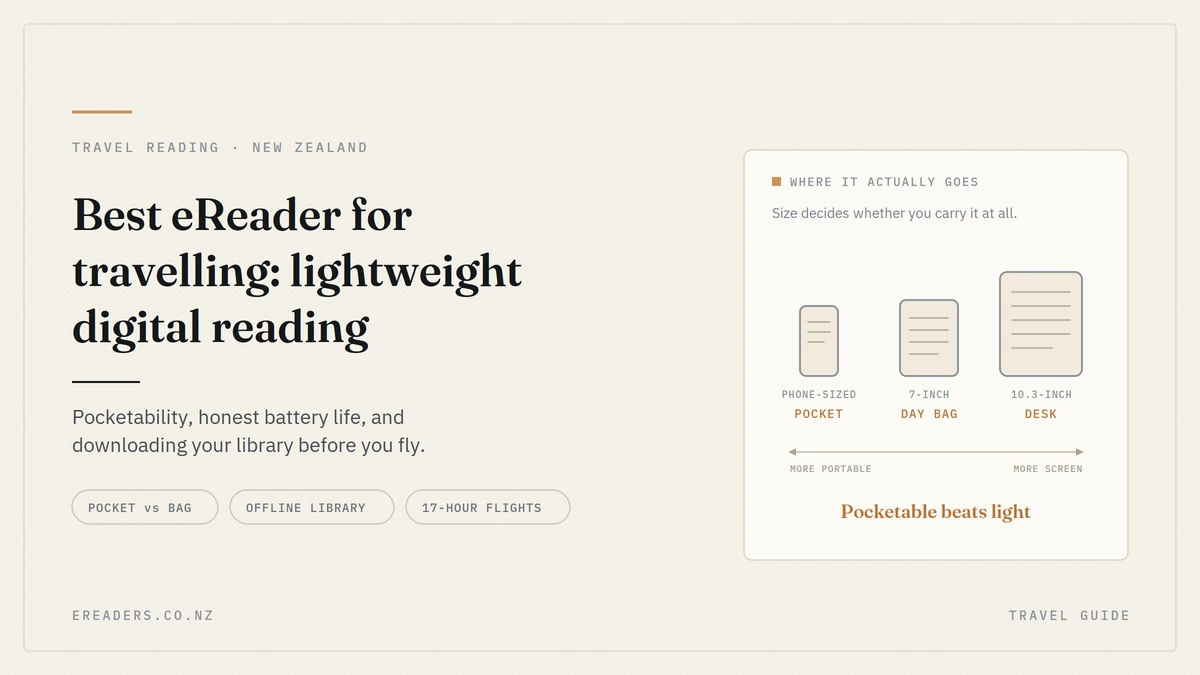
Pocketable beats light the spec that actually decides it
The number to care about isn’t grams, it’s whether you can hold the device in one hand and stow it without opening your bag. A device that lives in a jacket pocket gets read on the bus, in the queue, and during the descent. Anything larger gets read only when you sit down and unpack.
That distinction changes what “best for travel” means. A slightly heavier device you’ll actually carry beats a lighter one that stays in the suitcase.
The phone-sized category
The Palma 2 and Palma 2 Pro put E Ink into a phone form factor. One-handed, jacket-pocket sized, and readable in direct sun in a way your phone isn’t. For transit reading buses, queues, boarding lounges, the middle seat — this category is unmatched.
The trade-off is text area. You’ll turn pages more often, which most readers stop noticing within a day.
The compact reader category
The Go 6, Go 7 and Page 7 sit in the classic paperback zone. Bigger text area, still comfortable one-handed for most people, and small enough for a day bag rather than a suitcase.
If you read for long stretches rather than in five-minute gaps, this is usually the sweet spot.
When a bigger screen is worth the bulk
A 10.3-inch device like the Go 10.3 is a “read in the apartment” device, not a “read in seat 34K” device. It earns its place on study trips, long stays and work travel with PDFs where you’ll be at a desk or a table often enough to justify carrying it.
For a two-week holiday with a lot of transit, it’s the wrong tool.
Battery: what the numbers assume, and what actually happens
Published battery figures assume Wi-Fi off and light front-light use. Turn Wi-Fi on, leave background apps running and read with the light bright, and you’ll see a fraction of the quoted figure particularly on Android-based models.
None of this is a defect. It’s just worth knowing before you plan a five-day tramp around a marketing number.
Four settings that decide your real battery life
- Turn Wi-Fi off once you’ve downloaded. This is the single biggest saving, and on a trip you don’t need it anyway.
- Run the front light as low as the conditions allow. In a lit cabin or daylight, off entirely.
- Use warm light at night rather than bright cool white kinder on your eyes and on the battery.
- Close background apps on Android models. Sync services quietly checking for updates are a slow leak.
Do you need a power bank?
- A weekend away: No. Charge before you leave.
- Two to three weeks with hotel power: No, but bring the cable.
- A campervan trip: No — you’ll have USB power.
- Five days on a Great Walk with no power at all: Take a small power bank. Not because the device is weak, but because coming home with a dead reader on day four of five is a miserable outcome for the sake of 150 grams.
Charging on the road
BOOX devices charge over USB-C, which means one cable for your phone, your reader and increasingly everything else. That’s one less adapter in the bag and one less thing to lose in a hotel room.
Load your library before you leave
The most common travel eReader failure has nothing to do with the device. It’s arriving somewhere with an empty library because the books were downloaded to your account but never onto the device. It’s a five-minute job at home and impossible at 35,000 feet.
Do this the night before you fly, not at the airport.
A pre-departure checklist
- Download every book onto the device, not just purchase it. Look for the actual downloaded indicator in each app.
- Open each reading app once while still on Wi-Fi, so it completes any pending sync or licence check.
- Test one DRM-protected title offline — turn Wi-Fi off at home and confirm it opens. Some titles need a licence refresh you can’t get in the air.
- Sideload anything you own outright, like EPUBs and PDFs, straight to the device storage.
- Charge fully the night before. Not the morning of.
- Pack more than you think you’ll read. Storage is free; regret at hour twelve isn’t.
Where New Zealand readers get books
Libby with an Auckland Libraries or other NZ library card works well on Android-based BOOX devices, and it’s free. Kindle, Kobo and Google Play Books apps all work on models with Google Play support, which is one of the practical advantages of an Android reader — you’re not locked to one store.
One catch worth planning around: library loans expire on schedule, even offline. A three-week loan borrowed the day before a four-week trip will vanish mid-holiday. Borrow late, or download purchased titles as backup.
If you’re moving an existing Kindle collection across, our guide to moving your Kindle library to BOOX covers the practical options.
Audiobooks and Bluetooth
Models with Bluetooth and Google Play can run audiobook apps, which is genuinely useful on a long flight when your eyes are done. Check your specific model supports it before relying on it as your only entertainment.
Rules, risks and the things that go wrong in transit
Three practical realities: airline battery rules, water and sand, and the fact that a device sitting on a café table in a transit hub is a target.
Flying with an eReader
Lithium-battery devices belong in your carry-on, not checked baggage that’s standard across airlines and it applies to eReaders as much as laptops. Practically, an eReader is one of the easiest devices to travel with: it’s small, it’s allowed through most of the flight, and since you’re reading offline anyway, flight mode changes nothing about your experience.
Water, sand and heat
Be aware that BOOX devices are generally not water rated, unlike some competing readers that carry an IP rating. If your trip involves a beach, a pool, a kayak or a boat, that’s a real consideration.
The fix is cheap: a resealable dry bag or even a ziplock lets you read at the beach without anxiety, and E Ink stays perfectly readable through clear plastic. Sand is the other beach hazard it works into ports and edges, so a case with some coverage is worth having.
Heat matters too. Don’t leave any device on a car dashboard in a Northland summer. Our guide to protecting your BOOX covers cases and screen protection in more detail.
Theft and loss
Keep it out of sight in transit hubs and cafés — an eReader on a table reads as a tablet to an opportunist. Worth a quick check that your travel insurance covers electronics, and what the excess is relative to the device’s value.
Mono or colour for travel?
For travel specifically, mono is the better choice. Colour E Ink screens are dimmer, need more front light, and use more battery — three things that all matter more when you’re away from power. Colour earns its place for comics, magazines and illustrated study material.
Mono for travel: brighter in daylight, better battery, lighter on the wallet if it goes missing.
Colour for travel: worth it if you read manga, comics or magazines, or if you’re travelling for study with illustrated material. Accept the battery cost knowingly.
Which BOOX suits which kind of trip
Match the device to the trip’s shape — how much transit, how much power access, how much you’ll carry.
| Model | Screen | Pocket or bag | Travel battery use | Best trip type |
|---|---|---|---|---|
| Palma 2 / Palma 2 Pro | Phone-sized | Excellent with Wi-Fi off | Long-haul flights, commuting, city travel | |
| Go 6 | 6″ | Pocket or small bag | Excellent | Backpacking, minimal packing |
| Go 7 | 7″ | Small bag | Very good | General holidays, campervan trips |
| Page 7 | 7″ | Small bag | Very good | Straightforward reading travel |
| Go Color 7 (Gen II) | 7″ colour | Small bag | Good — colour costs battery | Manga, magazines, study travel |
| Go 10.3 | 10.3″ | Day bag | Good | Long stays, work and study trips |
[PLACEHOLDER: insert exact weights and dimensions for each model from your product pages. On a “lightweight” keyword the grams are the entire argument, and approximate figures aren’t good enough here.]
If your question is really “which BOOX suits me generally” rather than “which suits my trip,” our guide to choosing the right BOOX for your reading style is the better starting point.
Long-haul flights from New Zealand
Our flight lengths change the maths. Advice written for European travellers assumes two-hour hops; a Kiwi flying to Europe is looking at 24 hours or more of travel time including transit. That makes offline library depth and one-handed comfort far more important than they’d be elsewhere.
Pack more books than seems reasonable, and prioritise a device you can hold comfortably for hours without a table.
Campervan and road trips
Charging is easy — you’ve got USB power. The issues are glare and heat. E Ink handles the glare beautifully, which is exactly why it beats a tablet for reading at a campsite. Keep it out of direct sun on the dash.
Tramping and Great Walks
No power for days, and weight counts in grams. This is where the phone-sized category earns its keep, along with a dry bag: New Zealand weather in the backcountry doesn’t ask permission. Download everything before you lose signal, turn Wi-Fi off at the trailhead, and keep the front light low in the hut so you don’t light up the bunkroom.
[PLACEHOLDER: firsthand account — a real trip with a specific device. Days away from power, what battery percentage it came home with, and what you’d do differently. One concrete story is worth more than the whole table above.]
A packing checklist for digital readers
- Charge to 100% the night before
- Download all books onto the device and verify offline
- Wi-Fi off once downloads are done
- Case on, screen protected
- USB-C cable — shared with your phone
- Dry bag if there’s any water on the itinerary
- Device in carry-on, never checked
- A reading app on your phone as backup, just in case
FAQs
What’s the lightest eReader for travelling?
For pure portability, phone-sized devices like the Palma 2 are the most travel-friendly because they fit a pocket rather than a bag. The Go 6 is the lightest of the traditional reader shapes. Check current weights on each product page, as they vary between generations.
Can I use an eReader on a plane?
Yes. eReaders must travel in your carry-on rather than checked baggage because of the lithium battery, and they’re usable through most of the flight. Since you’ll be reading offline anyway, flight mode makes no difference to your experience.
How long does an eReader battery last on a trip?
It depends heavily on settings. With Wi-Fi off and modest front-light use, you can expect many days to weeks of reading. With Wi-Fi on, the light bright and background apps running on an Android model, expect substantially less.
Do I need Wi-Fi to read on an eReader overseas?
Not once your books are downloaded onto the device that’s the whole point of preparing before you leave. You’ll only need a connection to buy or borrow new titles, or to refresh some DRM licences.
Are BOOX eReaders waterproof?
Generally no. BOOX devices are not water rated in the way some competing readers are, so treat water and sand as genuine risks. A dry bag or resealable pouch is an inexpensive solution and E Ink remains readable through clear plastic.
Is an eReader better than reading on my phone while travelling?
For reading, usually yes E Ink is readable in direct sunlight, uses far less battery, and doesn’t interrupt you with notifications. Your phone stays free for maps, boarding passes and photos, which matters more than it sounds on a travel day.
Can I borrow library books from New Zealand while I’m overseas?
Yes, if you download them before you go or have a connection while away. Libby works on Android-based BOOX models with an NZ library card. Remember that loans expire on schedule regardless of where you are, so borrow close to departure for long trips.