You’ve decided you want a paper-like screen instead of another glowing tablet. Then you start shopping and hit a wall. One device is called an eReader and costs around $300. Another is called an E Ink tablet and costs $800 or more. In the photos, the screens look identical.
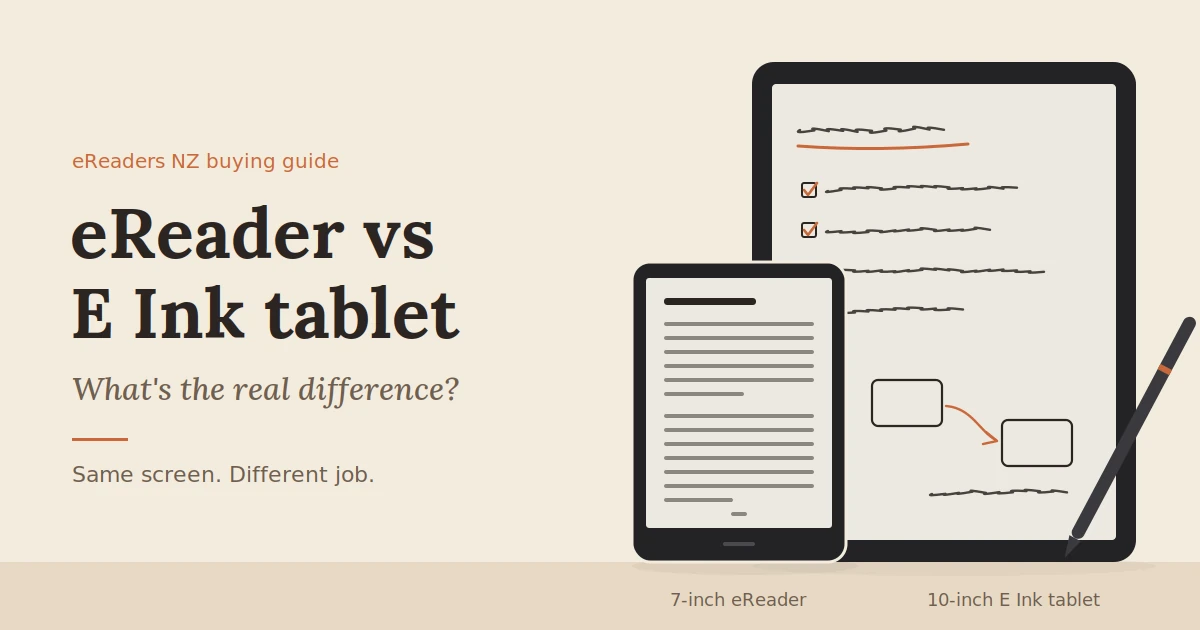
So what’s the difference between an eReader and an E Ink tablet? Mostly, it comes down to the job the device is built for. The screen technology is the same. The size, the pen, the software and the price all follow from that job.
eReader vs E Ink Tablet
This guide breaks those differences down in plain terms, shows where the two categories overlap, and helps you work out which one suits the way you actually read and work in New Zealand.
The short answer
An eReader is a reading device. It is usually 6 to 7 inches, light enough to hold in one hand, and built around a bookstore or reading app. An E Ink tablet is larger and built for reading plus writing, annotating and running apps, usually with a stylus. Both use the same paper-like E Ink display.
A useful way to picture it: an eReader replaces a paperback. An E Ink tablet replaces a paperback, a notebook and a folder of printed PDFs.
That’s the clean version. In practice the line has blurred, and some of the most interesting devices sit right in the middle. We’ll get to those shortly.
What eReaders and E Ink tablets have in common
Both use E Ink, a reflective display that looks like printed paper rather than a lit screen. Both are easy to read in bright sun and comfortable for long sessions. And both offer battery life measured in days or weeks, not hours.
Here’s what that shared screen technology gives you, whichever category you choose:
- No backlight shining at your eyes. E Ink reflects ambient light like paper. For reading in the dark, a front light washes across the surface instead of beaming through it, and many models let you warm the light’s colour for evening reading.
- Readable in full sun. Glare that washes out a phone at the beach or on the deck barely affects E Ink. Under strong New Zealand summer light, that difference is obvious within seconds.
- Very low power use. The display draws power mainly when the page changes. A static page costs almost nothing to show.
- Slower refresh. E Ink is not built for video or fast scrolling. Pages change in a fraction of a second, and you’ll occasionally see a faint ghost of the previous page before a full refresh clears it.
So if both categories share these strengths and limits, the screen isn’t what separates them. The differences sit everywhere else.
The differences that actually matter
The real differences are purpose, size, pen input, software, processing power and price. An eReader is optimised to do one thing with as little friction as possible. An E Ink tablet trades some of that simplicity for flexibility. Every other difference flows from that choice.
1. What it’s designed to do
An eReader is reading-first. You open a book, turn pages and close it. The menus, buttons and store are all shaped around that loop.
An E Ink tablet is input-first. It expects you to write, mark up documents, organise files and switch between apps. Reading is one job among several.
2. Screen size and weight
Most eReaders are 6 to 7 inches, the size of a paperback. They typically weigh under 250 g, so you can hold one in one hand on a bus or in bed.
E Ink tablets usually start around 10 inches and go up to 13 inches, close to A5 and A4 paper. They weigh roughly 370 g to over 500 g. That extra size matters most for PDFs. A textbook page or a research paper shown at full size on 10.3 inches is readable; squeezed onto 6 inches, it means constant zooming.
3. Pen and handwriting
This is the clearest dividing line. Most eReaders have no pen support at all. E Ink tablets include a digitiser layer under the screen, so a stylus can write with pressure sensitivity and low lag.
If you want to handwrite meeting notes, sketch ideas or annotate PDFs in the margins, you’re shopping for a tablet (or one of the hybrids covered below).
4. Software and app access
Many eReaders run a closed system tied to one bookstore. That keeps things simple, but you can only read what that ecosystem supports.
E Ink tablets vary. Some run a focused writing system with few apps. Others, including BOOX, run Android with Google Play, so you can install Kindle, Kobo, Libby, cloud storage and note-taking apps on the same device. The trade-off is more settings to learn.
5. Processing power and refresh
Writing, scrolling and running apps need a faster processor and more memory than turning book pages. E Ink tablets usually have both, along with refresh modes that trade some sharpness for speed when you’re scrolling a web page or document.
6. Price in New Zealand
Compact eReaders in NZ generally sit in the $250–$500 range. E Ink tablets start around $800 for 10-inch models and pass $1,000 for larger, colour and pen-focused devices. You’re paying for the bigger screen, the digitiser and the extra hardware.
eReader vs E Ink tablet: side-by-side comparison
The table below sums it up. If most of your answers land in the left column, an eReader will serve you well. If they land on the right, look at tablets.
| Feature | eReader | E Ink tablet |
|---|---|---|
| Main purpose | Reading books | Reading, writing, annotating, working |
| Typical screen size | 6–7 inches | 10–13 inches |
| Typical weight | Under 250 g | About 370 g to over 500 g |
| Stylus support | Usually none | Standard on most models |
| Software | Often one bookstore’s system | Writing-focused system or open Android |
| PDFs and textbooks | Workable, lots of zooming | Comfortable at near page size |
| Physical page-turn buttons | Common on 7-inch models | Rare |
| Colour options | Available on some models | Available on some models |
| Battery life | Often weeks | Days to a couple of weeks, depending on use |
| Typical NZ price | About $250–$500 | About $800 to over $1,000 |
Prices are typical ranges at the time of writing and vary by model and sale period.
Where the line between eReader and tablet blurs
The two categories are converging. Some eReaders now run full apps, some accept a stylus, and colour screens appear in both. Labels on product pages are a rough guide at best. Your reading and working habits are a better one.
Three kinds of device sit in the middle:
- Android eReaders. Compact BOOX models like the Go 6, Go 7 and the phone-sized Palma are eReader-sized, but they run Android with Google Play. You can read Kindle and Kobo books, borrow from the library with Libby and listen to audiobooks, all on one paper-like screen.
- Reading devices with a pen. The Kindle Scribe and Kobo Libra Colour both accept a stylus. They add note-taking to a reading-first device, though within each brand’s own ecosystem.
- Colour E Ink. Colour screens such as Kaleido 3 now appear on both small readers and large tablets. Colour is softer than on an LCD, and colour detail is shown at a lower resolution than black and white text. It suits comics, magazines, highlighted notes and charts more than photos.
Our take: stop asking which category a device belongs to and ask what you’ll do with it on an ordinary Tuesday. If the honest answer is “read novels before bed”, the simplest eReader you like is the right buy. If it’s “read, mark up a PDF, then jot notes in a meeting”, you need tablet features, whatever the box says.
[EXPERIENCE PLACEHOLDER: Add a short firsthand comparison of reading the same A4 PDF (e.g. a council report or textbook chapter) on a 7-inch device versus a 10.3-inch device. Note zoom steps needed, page-turn feel and which you’d actually use for study.]
Which one should you choose?
Choose an eReader if you mainly read books and want something light and simple. Choose an E Ink tablet if you work with PDFs, take handwritten notes or want a large screen for study. If you want apps in a pocketable size, an Android eReader covers the middle ground.
You mostly read novels
Go with an eReader. A 6- or 7-inch screen shows a novel page comfortably, and the low weight matters more than anything else during an hour of reading in bed. Paying for a pen you’ll never use doesn’t make sense.
You study or work from PDFs
Look at a 10-inch or larger E Ink tablet. University readings, legal documents, manuals and reports are laid out for paper. A larger screen shows them close to page size, so you can read without zooming and panning across every page.
You take handwritten notes every day
An E Ink tablet with a stylus is the right tool. Writing on E Ink has a slight paper-like texture that many people find easier to think with than typing. Notes can usually be exported as PDFs or synced to cloud storage.
You want one pocketable device with apps
Consider an Android eReader or a phone-sized E Ink device. You get access to several bookstores and your library in one place, without carrying a 10-inch tablet.
You read comics, manga or magazines
A colour E Ink screen is worth a look, and screen size matters here too. Manga works well on 7 inches; full-page comics and magazines are easier on 10 inches.
[EXPERTISE PLACEHOLDER: Add the two or three questions NZ customers most often ask our team before choosing between a compact reader and a tablet, and how we usually answer them.]
Pros and cons of each
eReaders win on simplicity, weight, battery life and price. E Ink tablets win on screen size, handwriting and flexibility. Neither is better overall; each is better at a different job.
eReader
Pros
- Light and easy to hold in one hand
- Long battery life, often weeks between charges
- Simple to use, with little to set up
- Lower price
Cons
- Small screen makes PDFs and textbooks awkward
- Usually no pen or handwriting support
- Often limited to one bookstore’s ecosystem
E Ink tablet
Pros
- Large screen for PDFs, documents and textbooks
- Handwriting and annotation with a stylus
- Android models run reading, library and productivity apps
- Replaces a notebook and a stack of printouts
Cons
- Heavier and less comfortable for long one-handed reading
- Higher price
- More settings and features to learn
- Battery life shorter than a simple eReader when using apps or writing heavily
NZ-specific things to check before you buy
Before you buy in New Zealand, check three things: how you’ll borrow library eBooks, which stores your books come from, and where warranty claims will be handled. These matter more here than in most buying guides, which are often written for US readers.
- Library eBooks. Many NZ public libraries lend eBooks and audiobooks through Libby, BorrowBox or both. Libby’s “send to Kindle” option only works with US libraries, so a Kindle can’t borrow from your local library that way. Kobo eReaders have OverDrive built in. Android E Ink devices can install the Libby and BorrowBox apps directly. Check which services your library uses before you choose.
- Your existing library. Already own Kindle or Kobo books? Those stay tied to their own apps. A Kindle or Kobo device reads its own store’s books; an Android device can run both apps side by side.
- Warranty and consumer rights. The Consumer Guarantees Act gives you rights to goods of acceptable quality, on top of any manufacturer warranty. Buying from a New Zealand stockist with local support usually makes a claim simpler than shipping a device back overseas.
- Charging and accessories. Most current devices charge over USB-C. If you’re buying a tablet, check whether the stylus and a cover are included or sold separately, as this changes the real price.
[DATA PLACEHOLDER: If available, add which NZ library services our customers most often set up on their devices, or a short customer example of moving from a Kindle to an Android E Ink device.]
FAQs
Is an E Ink tablet worth it if I only read books?
Usually not. If you only read novels, an eReader is lighter, cheaper and easier to hold for long periods. A tablet is worth the extra cost when you’ll also use the larger screen, pen or apps.
Can an eReader take notes?
Most basic eReaders only let you highlight text and type short notes on the screen. A few reading-first models, such as the Kindle Scribe and Kobo Libra Colour, add stylus support for handwritten notes.
Can I read Kindle books on an E Ink tablet?
Yes, if the tablet runs Android with Google Play. You can install the Kindle app, sign in and read your existing library. Tablets that run a closed, writing-focused system may not support the Kindle app.
Are E Ink tablets better for your eyes than an iPad?
Many people find E Ink more comfortable for long reading because it reflects light like paper and has no backlight shining at you. Comfort varies from person to person. If you have an eye condition, ask your optometrist.
Is a Kindle Scribe an eReader or an E Ink tablet?
It sits in between. It has a large screen and pen support like a tablet, but it runs Amazon’s own system without third-party apps. Think of it as a reading-first device with note-taking added.
What size E Ink tablet is best for PDFs?
About 10 inches is the practical minimum for A4 PDFs without constant zooming. A 13-inch screen shows A4 pages close to full size, at the cost of extra weight and price.
Find the right fit for how you read
The right device is the one that matches your ordinary week, not the one with the longest spec sheet. If you mostly read, go small and simple. If you read, write and work from documents, go bigger and add a pen.
Still weighing it up? Browse BOOX eReaders and E Ink tablets in New Zealand, from pocket-sized Android readers to 13-inch notebooks. Or get in touch with our Auckland-based team, tell us what you read and how you work, and we’ll point you to a model that fits.