Protect Your BOOX E Ink Screen Tablet Like a Pro: Tips to Protect Your BOOX Device, BOOX E Ink, BOOX Palma, BOOX Go Color 7 & ONYX Tablet — Care Tips for the Reinforced Ink Screen of Your BOOX and Take Good Care
Protect your BOOX E Ink screen with these smart care tips. Learn how to clean, store, and shield your tablet for long-lasting performance.
Reading on BOOX eReaders feels like holding a paper book—clear, comfortable, and glare-free. But this unique E Ink technology also makes your screen more sensitive to damage than standard LCD or OLED displays. With a little preventive care, you can keep your device in perfect condition for years.
Why BOOX E Ink Screens Need Extra Protection take good care
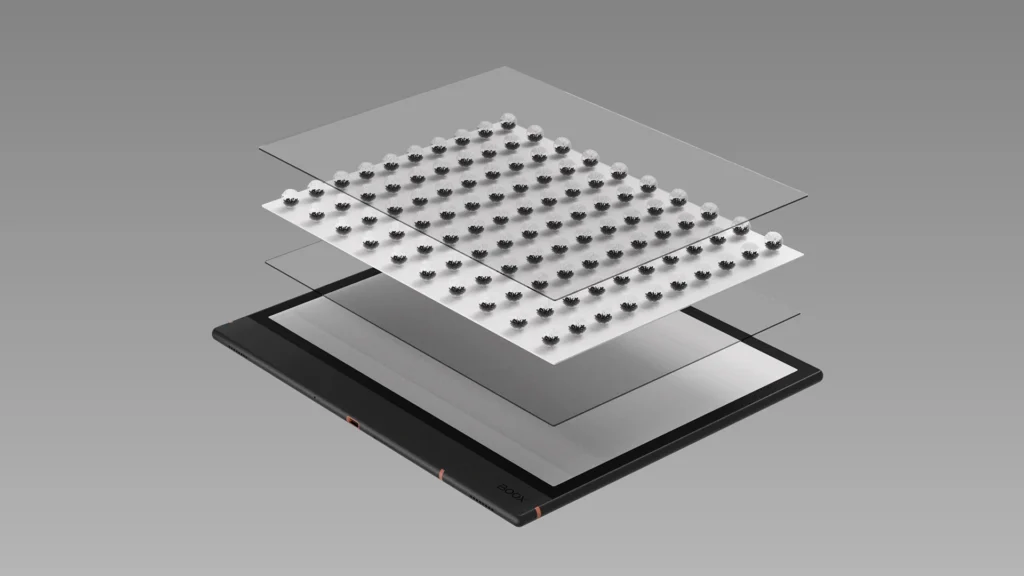
E Ink displays use millions of microcapsules to create their crisp, paper-like visuals. This design makes them energy-efficient and eye-friendly but also more fragile under pressure or impact.
✅ Best Practices for Protect Your BOOX
- Use a Protective Case or Folio
Invest in a high-quality BOOX protective folio to guard against scratches and light drops. Even small accidents—like knocking your tablet off the desk—can result in cracks without proper protection. - Avoid Heavy Pressure in Bags or Desks
Always place your tablet at the top of your bag or in a dedicated sleeve. Don’t store it with sharp objects like pens or keys, which can puncture the display. - Keep Away from Heat, Cold, and Humidity
Direct sunlight or extreme temperatures can warp your E Ink screen. Similarly, moisture—whether from beach trips or damp windows—can seep into the device. If it’s uncomfortable for you, it’s unsafe for your BOOX. - Clean the Screen Safely
- Power off your BOOX before cleaning.
- Use a soft microfiber cloth to remove dust and fingerprints.
- For stubborn marks, lightly dampen the cloth with distilled water—never spray directly on the device.
- Dry with the clean side of your cloth and avoid alcohol-based or abrasive cleaners.
🚫 What to Avoid
- Don’t immerse your device in water.
- Don’t use harsh chemicals or alcohol wipes.
- Avoid stacking heavy items on your tablet or applying pressure to the screen.
stylus | boox note air5 c | easy on the eyes | home screen
📌 Final Thoughts
Taking small steps—like using a folio, handling your tablet carefully, and cleaning it properly—can save you from expensive repairs and keep your BOOX Note Air4 C running beautifully. Explore our eReaders accessories for the best protective options and ensure your reading experience stays distraction-free.
📋 BOOX E Ink Screen Care – FAQ
1. Why are BOOX E Ink screens more fragile than LCD or OLED screens?
E Ink screens are built with millions of microcapsules suspended between thin layers. This design creates a paper-like reading experience but makes the display more sensitive to pressure and impact than traditional LCD or OLED panels.
2. Do I really need a protective folio or case for my BOOX?
Yes. A protective folio absorbs shocks from light drops, shields against scratches, and prevents accidental damage—making it one of the most effective ways to extend your device’s lifespan.
3. How can I safely carry my BOOX tablet in a bag?
Place your device at the top of your bag or in a dedicated padded sleeve. Avoid stacking heavy objects on top of it and keep sharp items like keys or pens away from the screen.
4. Can extreme temperatures or humidity damage my BOOX eReader?
Absolutely. Prolonged exposure to direct sunlight, extreme heat, cold, or high humidity can stress the E Ink screen and internal components. Store your tablet in moderate conditions to avoid long-term damage.
5. What’s the best way to clean a BOOX E Ink display?
Turn off the device, then gently wipe the screen with a dry microfiber cloth. For stubborn smudges, lightly dampen the cloth with distilled water. Never spray liquids directly on the screen or use alcohol-based cleaners.
6. What cleaning products should I avoid using on my BOOX device?
Avoid alcohol wipes, harsh chemicals, or abrasive cleaners. These can scratch or damage the sensitive surface of an E Ink screen.