
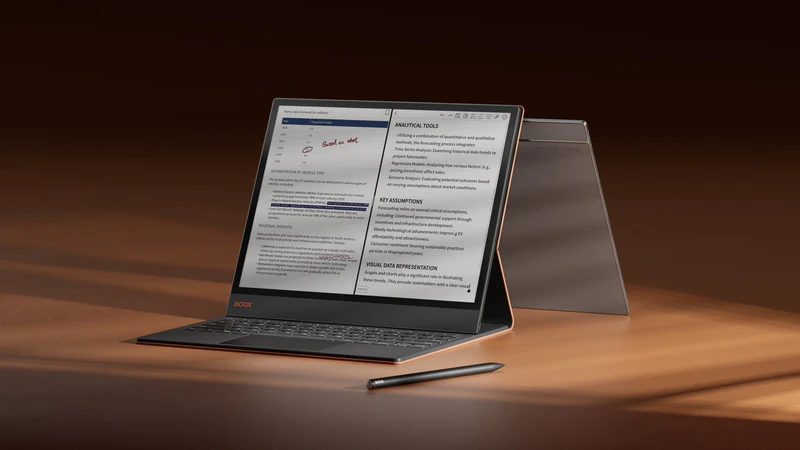
BOOX Magnetic Keyboard Cover with Trackpad for Note Max & Tab X C
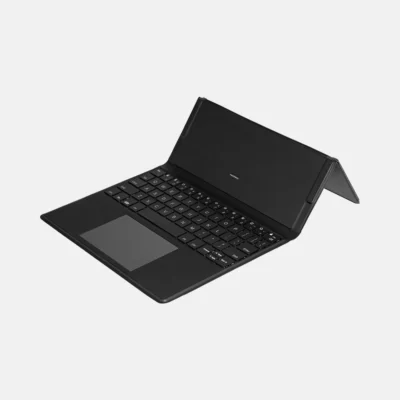
Transform your 13.3″ BOOX tablet into a powerful productivity workstation with the BOOX Magnetic Keyboard Cover featuring an integrated trackpad. Designed specifically for the Note Max and Tab X C, this premium accessory offers seamless pogo-pin connectivity, distraction-free typing, and professional-grade functionality for enhanced productivity.
Key Features
- Pogo-Pin Connectivity: Instant connection with no Bluetooth pairing or external power required
- Integrated Trackpad: Built-in precision trackpad for seamless navigation and control
- Full QWERTY Layout: Complete keyboard with all letters, numbers, symbols, and shortcuts
- 51 Language Support: Comprehensive language layout compatibility
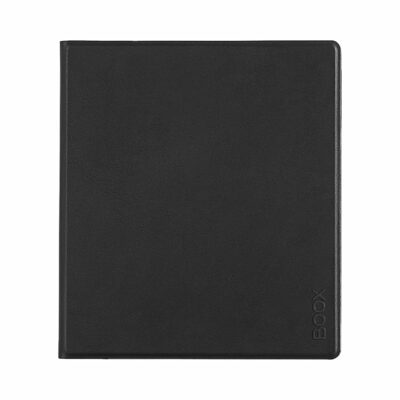
- Premium Protection: Magnetic folio design protects front and back of device
- Instant Activation: Keyboard activates immediately upon magnetic attachment
- Professional Design: Premium PU leather construction with anti-fingerprint material
Revolutionary Pogo-Pin Technology
Experience seamless connectivity and instant productivity:
- Instant Connection: Pogo-pin connectors attach securely for immediate keyboard activation
- No External Power: Keyboard powered directly by tablet through connection pins
- No Bluetooth Required: Direct connection eliminates pairing hassles and latency
- Secure Attachment: Magnetic design ensures stable connection during use
- Plug-and-Play: Simply attach and start typing immediately
Enhanced Productivity Features
Designed for professional workflows and distraction-free productivity:
- Laptop-Like Experience: Transform tablet into a complete workstation
- Split-Screen Ready: Perfect for multitasking workflows
- Integrated Shortcuts: Quick access to multitasking, screen lock, and system functions
- Precise Navigation: Built-in trackpad with smart gesture support
- Professional Typing: Full-size keys for comfortable extended typing sessions
- Distraction-Free Focus: Pairs with ePaper display to minimize distractions
Seamless Trackpad Integration
Advanced navigation capabilities built right into the keyboard:
- Precision Control: Accurate cursor movement and navigation
- Multi-Touch Support: Gesture recognition for enhanced productivity
- Click Functionality: Left and right click capabilities
- Scroll Support: Natural scrolling through documents and web pages
- Smart Gestures: Customizable gestures for workflow optimization
Universal Language Support
Comprehensive international compatibility:
- 51 Language Layouts: Support for global languages through device software
- Easy Switching: Quick language layout changes via system settings
- Regional Characters: Full support for special characters and symbols
- Professional Localization: Perfect for international business use
- Educational Applications: Ideal for language learning and multilingual work
Premium Construction & Design
Professional-grade materials and thoughtful design:
- Premium PU Leather: High-quality synthetic leather with sophisticated finish
- Anti-Fingerprint Surface: Maintains clean, professional appearance
- Magnetic Folio Design: Complete protection for front and back of device
- Lightweight Build: Only 618g – adds minimal weight to your setup
- Durable Construction: Built to withstand daily professional use
Perfect Device Compatibility
Specifically engineered for BOOX 13.3″ devices:
- BOOX Note Max: Perfect fit for the ultra-slim A4-sized notepad
- BOOX Tab X C: Ideal match for the color ePaper productivity tablet
- Precise Cutouts: All ports, buttons, and features remain accessible
- Perfect Alignment: Pogo-pin connectors align perfectly with device contacts
- Stable Platform: Secure magnetic attachment prevents shifting during use
Distraction-Free Writing Environment
Optimize your creative and professional workflow:
- ePaper Synergy: Combines with E Ink display for comfortable extended use
- Focused Writing: Minimizes visual distractions for deep work sessions
- Creative Freedom: Switch between typing and handwriting seamlessly
- Professional Drafting: Ideal for document creation and editing
- Research Workflows: Perfect for note-taking while reviewing materials
Enhanced Multitasking Capabilities
Powerful features for complex workflows:
- Split-Screen Support: Work with multiple applications simultaneously
- Quick App Switching: Integrated shortcuts for seamless multitasking
- Document Review: Type notes while reviewing PDFs and documents
- Research Tasks: Browse and take notes in parallel windows
- Professional Presentations: Create and edit content on the go
Integrated Shortcut System
Streamlined access to essential functions:
- System Shortcuts: Quick access to home, settings, and system functions
- App Navigation: Seamless switching between applications
- Screen Controls: Brightness, volume, and display adjustments
- Productivity Tools: Screenshot, screen lock, and refresh commands
- Custom Functions: Software-integrated shortcuts for enhanced workflow
Professional Applications
Perfect for various professional and creative uses:
- Business Writing: Reports, emails, and professional documentation
- Academic Research: Note-taking, paper writing, and literature review
- Creative Writing: Novels, scripts, and long-form content creation
- Technical Documentation: Manuals, specifications, and technical writing
- Journalism: Article writing and interview transcription
- Legal Work: Document drafting and case preparation
Technical Specifications
- Compatibility: BOOX Note Max, BOOX Tab X C (13.3″ devices)
- Connection: Pogo-pin connectors with magnetic attachment
- Keyboard: Full QWERTY layout with integrated trackpad
- Language Support: 51 language layouts via device software
- Material: Premium PU leather with anti-fingerprint coating
- Dimensions: Approximately 290 x 251 x 8mm
- Weight: Approximately 618g (21.8 oz)
- Power: Powered directly through device connection
- Special Features: Detachable magnetic flap, integrated shortcuts
What’s Included
- BOOX Magnetic Keyboard Cover with Trackpad
- Detachable magnetic flap (on select versions)
- User guide and setup instructions
- Warranty information
Setup & Usage
Simple setup process for immediate productivity:
- Attach Device: Place your Note Max or Tab X C in the keyboard cover
- Align Connectors: Ensure pogo-pins align with device contact points
- Magnetic Closure: Close cover to activate magnetic connection
- Instant Activation: Keyboard activates automatically upon connection
- Start Typing: Begin working immediately with full functionality
Professional Advantages
- Laptop Replacement: Complete mobile workstation in one package
- Eye-Friendly Computing: E Ink display reduces digital eye strain
- Extended Battery Life: ePaper technology enables all-day use
- Distraction-Free Work: Focus on content without notifications
- Portable Productivity: Professional computing anywhere
Why Choose This Keyboard Cover?
This isn’t just an accessory—it’s a complete productivity transformation that turns your BOOX tablet into a professional workstation. The combination of pogo-pin connectivity, integrated trackpad, and distraction-free ePaper display creates the ultimate environment for focused, productive work.
Transform your BOOX Note Max or Tab X C into a complete productivity powerhouse with the Magnetic Keyboard Cover with Trackpad—where professional typing meets distraction-free focus.
 No products in the cart.


&url=https://ereaders.co.nz/shop/boox-tab-ultra-c-pro-2/&media=https://ereaders.co.nz/wp-content/uploads/2024/09/1_5d0a05e1-b9fb-46d9-b11d-31578ce74.webp)


Reviews
There are no reviews yet.